# What is Consenter?
URL: /consenter
Learn how Consenter balances functionality, transparency and data protection.
Consenter is a new generation of consent management that combines transparent risk communication, user-controlled privacy preferences, and legally compliant consent collection. The system consists of the Consenter Cookie Banner for website operators and the Consenter Consent Agent for internet users. Together, they enable consent decisions that are not only technically valid but also genuinely informed.
At the core of the Consenter Cookie Banner – alongside its ability to communicate with the Consenter Consent Agent – is its integrated Risk Assessment. This assessment provides the methodological foundation for a legally compliant configuration. Unlike conventional cookie banners, Consenter goes beyond the mere technical collection of consent by systematically evaluating the data protection implications of your specific settings. In combination with the Consent Agent, this enables genuinely informed consent. As such, Consenter represents a new state of the art that website operators must consider, particularly in light of Articles 25 and 32 GDPR (see section 2 for details).
The Consenter Risk Assessment illustrates how the use of specific technologies on your website, as well as their configuration, affects the fundamental rights of your visitors. The results are displayed in the Consenter Manager and form the basis for transparent communication within the banner. This allows users to make an informed decision about whether the benefits of consenting are proportionate to the associated risks.
By presenting both risks and benefits transparently, you can build greater trust with your visitors compared to conventional banners—especially when technologies are configured in a privacy-friendly way. Research conducted by our team, in collaboration with other institutions, shows that this approach significantly improves user experience and increases the likelihood that users will consent to data processing.
This documentation explains how the risk assessment works, which factors are taken into account, and how to use the provided configuration guides to achieve an appropriate balance between functionality and data protection.
In principle, any member of your team can set up the Consenter Cookie Banner. However, depending on the configuration step, it may be advisable to involve:
* Someone who can assess the necessity of the technologies’ functionality (typically marketing).
* Someone who can evaluate legal requirements (typically data protection or legal).
* Someone responsible for technical implementation and integrations (typically IT or web development).
We will indicate at relevant points which roles should be involved.
# FAQ
URL: /faq
Frequently asked questions about the Consenter Cookie Banner.
A consent banner is a visual interface through which end users can actively indicate that they agree to the processing of their data. On a consent banner you should explain for what purposes you collect what kind of data from your users, with whom you share the data, where they are stored, and other aspects. For consent to be legally valid, it is important that you obtain consent **before** collecting and processing data from your users (so-called opt-in).
**Contextual consent:** For some purposes, it is better not to use a cookie banner to ask for your users' consent when they enter your website, but only later when they want to engage with specific content of your website. This applies in particular to additional features that you integrate for a better user experience, such as maps, videos and social media content. See contextual consent guide →
**Opt-out instead of opt-in:** For some purposes, it is also sufficient to give your users the option to object to the processing of their data (so-called opt-out). Whether an opt-in or opt-out process is required depends on the risks that one or the other of your purposes poses to your users, as well as the applicable law.
Consenter works completely differently from previous consent management. Consenter provides you with a product addressing your legitimate need to achieve a
* legally required cookie banner
* as easily as possible,
* that is 100% compliant,
* trustworthy for your end users and
* has the highest (legally) possible consent rate (i.e. without manipulating designs).
In contrast, many website operators today design their consent mechanisms in such a way
* that users do not understand what they are actually consenting to;
* often, they also make it more difficult for users to refuse consent than to give it;
* and above all, they design consent in a way that is extremely fatiguing for end users.
In sum, all these deficits are used today to achieve the highest possible consent rates.
This is rather foolish, as these banners not only pose a serious compliance risk for website owners, but also destroy their user trust – even though they could achieve the same consent rates, and in some cases even higher rates, with truly transparent and fairly designed consent banners.
To reach this aim, **Consenter provides you with a high-end tool** in legal, visual and technical-organisational terms,
* giving you full control over both your compliance risks and your users' privacy risks;
* designing the interaction of your users with your consent requests over several building blocks;
* and helping you generate a competitive advantage from your efforts by increasing the trust of your users and thus even their consent rate.
These are the building blocks that Consenter uses to make consent a really trustworthy user experience:
* First of all, we enable your users to set their preferences in advance and centrally in a digital assistant (Consenter agent), specifying the purposes for which they generally give their consent when visiting all sorts of websites. This is the only known way to prevent consent fatigue.
* A second component enables your end users to adapt their default settings on your website they are visiting to the specific data protection level of your site; this interaction again runs via a layered approach, which adapts your consent requests to your users' needs when interacting with your website (from a so-called handover notice to the Consenter Banner up to contextual consent).
* In further development steps, we will provide you with additional tools that you may offer your users to check and adjust the quality of their data once they have shared it with you on the basis of their consent.
With our empirical research apparatus, we can prove that we have the most effective consent mechanism on the market: the state of the art, which every website operator must actually take into account, according to Art. 25 sect. 1 GDPR.
You don't need to be a privacy expert to set up the Consenter Banner. It's meant for:
* Anyone responsible for marketing (and wants to turn privacy into a competitive advantage)
* Anyone responsible for ensuring compliance and transparency.
* All website admins or developers who manage integrations.
Ideally, the person maintaining your website's tools should help set up the Consenter Banner.
This is a `z-index` issue in your website's CSS. We can't change how your elements are layered. However, we can show you how to adjust the order yourself in your website’s CSS.
To do this, right-click the element that's overlapping (or being overlapped) and open your browser's developer tools. Check its `z-index` and `position` values, then compare with the Consenter Banner's host element (`#consenter-host`). Adjusting the `z-index` on your elements will fix it.
Worth knowing: `z-index` only works on positioned elements (`position: relative`, `absolute`, `fixed`, or `sticky`), and only compares elements in the same [stacking context](https://developer.mozilla.org/en-US/docs/Web/CSS/CSS_positioned_layout/Stacking_context). Properties like `transform`, `filter`, or `opacity` create new stacking contexts, which is usually why things end up in front of or behind something when you don't expect them to.
# Consenter Documentation
URL: /
Configure and manage the Consenter Cookie Banner.
This documentation explains the data protection framework underlying the Consenter Cookie
Banner and guides you through its setup, configuration, and ongoing management in the
Consenter Manager.
## Learn the Framework [#learn-the-framework]
How the banner fits into the framework
Why informed consent requires a new state of the art
How choices affect data protection
***
## Set up the Cookie Banner [#set-up-the-cookie-banner]
Define purposes, tools, data, etc.
Risk Assessment Guides
Technical Integration Guides
Manage changes and consent updates
***
## Need Help? [#need-help]
Find answers about the cookie banner
***
This documentation is continuously updated to reflect legal, technical, and functional developments.
# Legal Requirements
URL: /legal-requirements
Understand the legal framework for consent and cookie banners.
## What is a cookie banner and when is it required? [#what-is-a-cookie-banner-and-when-is-it-required]
A cookie banner is a user interface that enables end users to actively provide consent to the processing of their personal data. It should clearly explain which types of data are collected, for which purposes, with whom the data is shared, where it is stored, and any other relevant information.
For consent to serve as a valid legal basis, it must be obtained before any personal data is collected or processed (“opt-in”).
For certain purposes, it is advisable to complement the cookie banner with [contextual consent](/technical-integration/contextual-consent). Unlike a cookie banner, contextual consent is not shown when users first visit a website, but only when they interact with specific content. A common example is the activation of “additional features” such as maps, videos, or social media content.
Because such services often involve the processing of personal data, users may only access them after giving consent.
Contextual consent helps users better understand the specific purpose of the processing and allows risks to be communicated in a more intuitive and situation-specific way.
For some purposes, it may be sufficient to offer users the option to object to the processing of their data (“opt-out”). In this case, personal data may be processed unless and until the user objects. This differs from the opt-in model, where processing is only permitted after consent has been given.
Whether an opt-in or opt-out mechanism is appropriate depends on the level of risk associated with the processing and the applicable legal requirements.
## Key legal provisions [#key-legal-provisions]
The following legal provisions are particularly relevant when implementing a cookie banner:
* General Data Protection Regulation (GDPR), in particular:
* Article 5 (principles such as lawfulness, fairness, transparency, purpose limitation, data minimisation, integrity and confidentiality, accountability)
* Article 6 (lawfulness of processing)
* Article 7 (conditions for consent)
* Articles 12–14 (information obligations)
* Article 21 (right to object)
* Articles 25 and 32 (data protection by design and by default; security of processing)
* ePrivacy requirements (in Germany, in particular the TDDDG), which regulate the storage of and access to information on end-user devices:
* Section 25 (protection of privacy in relation to end devices)
* Section 26 (recognised consent management services and end-user settings)
While the GDPR governs the processing of personal data, ePrivacy rules specifically address access to end-user devices (e.g. via cookies or similar technologies). Together, these provisions form the legal framework for configuring your cookie banner and designing consent processes.
## Requirements for valid consent [#requirements-for-valid-consent]
For consent to be legally valid, it must be freely given, informed, specific, unambiguous, and data subjects must be able to withdraw it at any time. In practice, the main challenge lies in ensuring that consent is truly informed.
Empirical studies show that conventional cookie banners often fail to provide users with sufficient understanding of what they are consenting to. As a result, the validity of such consent is questionable.
“Informed” means that users must be able to understand—before making their decision—which data is processed, for what purposes, which third parties are involved, and what impact this may have for them.
The Consenter Risk Assessment supports you in systematically capturing these information requirements and presenting them in a transparent and comprehensible way.
## Transparency obligations for informed consent [#transparency-obligations-for-informed-consent]
Before obtaining consent, website operators must provide clear, comprehensive, and easily accessible information. This includes, in particular:
* The specific purposes of processing.
* The technologies used (including third-party technologies, where applicable).
* The benefits and data protection risks for website visitors.
* How these technologies are configured, including:
* The role of third-party providers (e.g. processor, joint controller, or independent controller).
* Whether tracking is used and, if so, which type (e.g. first-party or third-party tracking).
* Whether personalisation or profiling is applied (e.g. group-based or individual profiling).
* The categories of personal data processed.
* The storage period.
* Whether data is transferred outside the EU and, if so, to which countries and under which safeguards for ensuring an equivalent level of protection.
This information must be presented in a clear, understandable, and accessible manner. Consenter supports this by providing a structured, visual, and technical framework for communicating these details effectively.
Within the Consenter Manager, you will be prompted to provide this information as part of the configuration process. These inputs are not optional—they are essential for obtaining valid, informed consent.
## State of the art (Articles 25 and 32 GDPR) [#state-of-the-art-articles-25-and-32-gdpr]
According to Articles 25 and 32 GDPR, you are required to implement appropriate technical and organisational measures to ensure data protection by design and the security of processing.
This includes designing consent mechanisms in a way that effectively protects users from risks to their fundamental rights. In doing so, you must take into account the “state of the art,” meaning the most effective and advanced methods currently available for implementing informed consent.
### Demonstration of effectiveness (Article 25(1) GDPR) [#demonstration-of-effectiveness-article-251-gdpr]
In its Guidelines 4/2019 on Article 25 (Data Protection by Design and by Default), the European Data Protection Board (EDPB) emphasises that demonstrating effectiveness is a central requirement for complying with Article 25 GDPR and thus for implementing GDPR obligations in general.
To demonstrate effectiveness, you must define performance indicators that allow you to measure whether and how effectively informed consent is implemented. These indicators may be quantitative or qualitative. Based on more than ten years of research, the Consenter research group has developed a range of such methods.
In practice, most existing cookie banners neither demonstrate effectiveness nor reflect the state of the art. Instead, they typically apply best practice implementations. However, such best practices differ from the “state of the art” required under Articles 25 and 32 GDPR: while widely used, their effectiveness is often unproven and they do not necessarily represent the most effective available solutions.
Moreover, substantial empirical evidence shows that conventional cookie banners fail to provide users with sufficient information. As a result, valid consent in accordance with Article 6(1)(a), in conjunction with Articles 25 and 32 GDPR, is often not obtained.
Consenter not only provides templates and evidence for the effective implementation of informed consent in accordance with Articles 25 and 32 of the GDPR, but also, for the first time, significantly advances the state of the art.
As a website operator, you can adopt these directly or indirectly. Direct adoption means that you integrate the Consenter cookie banner into your website. This automatically ensures you meet the current state of the art. An indirect implementation means that you develop your own cookie banner by simply adopting Consenter’s templates and specifications. This also allows you to comply with the current state of the art.
Incidentally, you can also further develop the state of the art yourself. To do so, you can apply the methods we have summarised in our freely accessible User Experience Design Toolkit.
### Informed consent (Articles 5, 6, 7 in conjunction with Article 25 GDPR) [#informed-consent-articles-5-6-7-in-conjunction-with-article-25-gdpr]
The following design principles enable significantly more informative and effective consent mechanisms compared to conventional approaches:
* **Specification of purposes:** Processing purposes must be defined in a way that allows users to understand the associated benefits and risks to their fundamental rights. Users typically base their decisions on such a balancing of benefits and risks.
* **Configuration of technologies:** The specific configuration of third-party services directly affects the level of risk. These implications must be transparently communicated to users.
* **Information distribution, layout, and visualisation:** Information should be structured across multiple layers according to relevance, in order to avoid overwhelming users. Key information—particularly purposes, benefits, and risks—should be presented at the first level of the cookie banner. Visual elements, such as privacy icons, should be used to enhance clarity.
* **Integration of consent agents:** Website operators should integrate signals from consent agents, as these significantly improve the level of informed consent. Consent supported by such agents is generally more informed and therefore more effective.
Side note: The integration of consent agents is foreseen in Section 26 TDDDG and is currently being discussed at EU level. Given that agent-supported consent mechanisms are already available and provide a higher level of informed consent, they represent the emerging state of the art. Accordingly, their consideration may already be required under Article 25 GDPR.
### Data minimisation, Article 5 in conjunction with Article 25 of the GDPR [#data-minimisation-article-5-in-conjunction-with-article-25-of-the-gdpr]
Website operators may only process as much personal data as they genuinely require. This is particularly important when they use third-party technologies. They must therefore check what the technology actually does and whether the processing can be restricted (“Know Your Tools”).
* **Adjusting the configuration:** When website operators use third-party technologies, they should not adopt the default configuration but should adjust the settings to their actual needs. The default configuration is often very broad and processes more data than is usually required.
* **Advertising purposes of the technology provider:** Some third-party providers also process the data for their own advertising purposes. In this case, website operators must inform their visitors of this and obtain consent for this purpose. A blanket reference to the third-party provider’s privacy policy, without specifying their processing purposes, is not sufficient.
* **Alternative technologies:** Website operators must assess whether they can use a technology that poses fewer risks to their visitors, provided that the technology posing greater privacy risks is not necessary. The fact that a technology posing greater privacy risks is the most widely used technology does not constitute a necessity.
Apart from the effective implementation of the data minimisation principle, website operators can achieve not only greater trust but also higher consent rates among their visitors by choosing a more privacy-friendly technology and configuring it appropriately.
### Control options, Articles 5, 6, 7 and Article 25 GDPR [#control-options-articles-5-6-7-and-article-25-gdpr]
Website operators must also integrate consent agents because this enables them to provide visitors to their website with significantly more effective control options:
* **Informed decisions:** With the help of a consent agent, website visitors can make significantly more informed decisions about the disclosure of their data. Website operators can thereby achieve not only greater trust but also higher consent rates.
* **Adaptation to system changes:** Once website visitors have made a decision, this must be respected on subsequent visits; their ability to make informed decisions must not be disrupted by the repeated display of a banner, as this increases consent fatigue and thus leads to less informed decisions.
* The use of consent agents is superior to the use of cookies because the former are persistent and ‘remember’ the decisions made by website visitors for as long as they use the agent. Cookies that store users’ decisions, on the other hand, are regularly deleted, with the result that the cookie banner appears on a return visit even though the user has already made a decision.
* Returning visitors must and may only be informed of changes to the website operator’s system that alter the data protection risk. As the basis for decision-making has thus changed, the control mechanisms must be adapted accordingly:
* If consent has already been given and the risk to the same fundamental rights subsequently increases, at least a notice of the increased risk is required, combined with the immediate option to withdraw consent.
* If the user did not grant consent for a specific purpose during the last visit and the website operator has since been able to reduce the risk, they may, conversely, ask for consent again for this purpose during a subsequent visit, as there is now a new basis for decision-making in this case as well.
* **Proof of consent:** Website operators must provide visitors with proof of whether and for what purposes they have obtained consent. The integration of a consent agent is a suitable solution for this, as it provides the agent’s users with an automated overview of to whom they have granted which consents. Equally effective alternatives are also permissible (see, for example, ISO/IEC TS 27560:2023 – Consent Records and Receipts).
Side note: Using these techniques, website operators can achieve greater trust – and thus higher consent rates – not only in the short term but also in the long term across multiple repeat visits.
### Documentation requirements and signal integrity, Articles 5, 6, 7 and Article 32 GDPR [#documentation-requirements-and-signal-integrity-articles-5-6-7-and-article-32-gdpr]
Website operators must be able to demonstrate that consent has been validly obtained and that legal requirements have been met.
This includes, in particular, the traceability of the chosen configuration, the transparency of the information provided and the documented granting of consent. Here too, Consenter is significantly advancing the state of the art.
In particular, website operators must store consents in such a way that they can demonstrably no longer be altered – usually via a signature procedure.
## Involvement of consent agents, §§ 25 and 26 TDDDG [#involvement-of-consent-agents--25-and-26-tdddg]
The obligation to accept signals from recognised consent agents arises from Sections 25 and 26 TDDDG. This is a German federal regulatory requirement that applies to all websites targeting or operating in Germany. Pursuant to Section 25 TDDDG, a website operator must obtain consent from its visitors if it wishes to store information on their device or access it. To address the issue of consent fatigue, Section 26 TDDDG builds on this provision and obliges operators to take into account signals from consent management services (hereinafter: consent agents), insofar as these have been recognised on the basis of a statutory instrument. The Federal Government has established this statutory instrument in the form of the so-called Einwilligungsverordnung (EinwV) ([official text at gesetze-im-internet.de](https://www.gesetze-im-internet.de/einwv/)). Consenter was recognised as a consent management service pursuant to Section 10 EinwV on 17 October 2025 ([BfDI recognition decision](https://www.bfdi.bund.de/DE/Fachthemen/Themen-Positionen/Einwilligungsverwaltung/Einwilligungsverwaltung_node.html)), meaning that websites must take its signals into account.
## Responsibility of the website operator [#responsibility-of-the-website-operator]
As the operator of your website, you are generally the controller within the meaning of the GDPR and the TDDDG. You determine the purposes and means of data processing and are responsible for compliance with the relevant requirements.
This also applies if you use third-party technologies. The use of external services does not relieve you of your legal responsibility.
# Maintain Your Banner
URL: /maintenance
Update your banner and communicate relevant changes to users.
Once you have set up your Consenter Banner for the first time, Consenter will display the technical status of your website from that exact moment. As our lives are constantly evolving, as is technology, you will probably want to adjust your processing procedures from time to time. The following adjustments are likely:
* You want to process your users' data for an additional purpose or no longer need a purpose for which you requested consent during the initial configuration of your website.
* You want to reconfigure a third-party tool that you use for one purpose or another by enabling or restricting certain functions of the tool.
* A third-party tool you use changes something in its system that is relevant to your GDPR compliance and/or your users.
* You do not use any third-party tools, but have implemented your own technical processes that you now wish to change.
You can always update such changes in Consenter Manager. Since we automatically process each of your entries in our risk assessment, we can automatically inform your users about the changes the next time they visit your website.
## How Consenter handles changes [#how-consenter-handles-changes]
Our automated risk assessment is unique on the market and very important for you and your users. The reason for this is that Consenter operates on the principle that users should not be shown information again if they have already made a decision for or against giving their consent based on this information. This principle is very important for the positive user experience of your users. In today's practice, many other website operators and consent management platforms (CMPs) create a poor user experience by repeatedly asking users for their consent and withholding relevant information about risks or fatiguing users with irrelevant information.
Consenter only makes an exception to the principle of not showing your users any further information if it is important for you and your users. Consenter adapts to users depending on whether they use the Consenter Agent (CA) or not. CA users only see a so-called handover notice, which disappears automatically after a certain time – unless a user opens the Consenter banner for more detailed information. Users without CA immediately see the Consenter banner, which they then have to close manually. These exceptions arise in the following three cases:
### Adding a new purpose? [#adding-a-new-purpose]
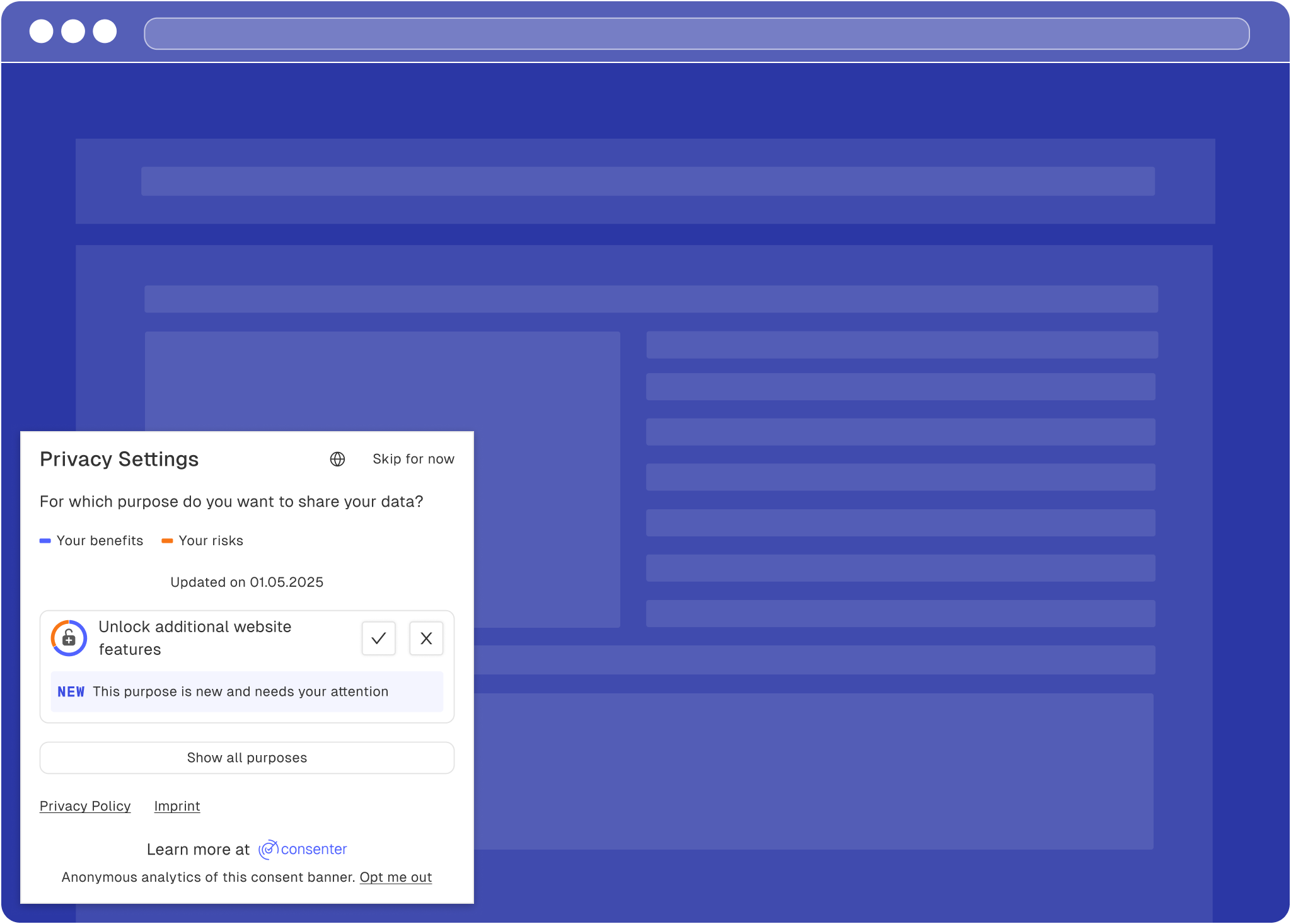
Since your user's last visit, you have selected an additional data processing purpose in Consenter Manager and would like to ask your users for their consent for this new purpose.
New purpose shown to CA-users
A new purpose for non-CA users
### Changing a tool (configuration)? [#changing-a-tool-configuration]
Since the last visit by one of your end users, you or the TPP have made a change to the technical organisational system. If this leads to a change in the risk-benefit ratio that is relevant to the user, you may or should inform them of this during their next visit:
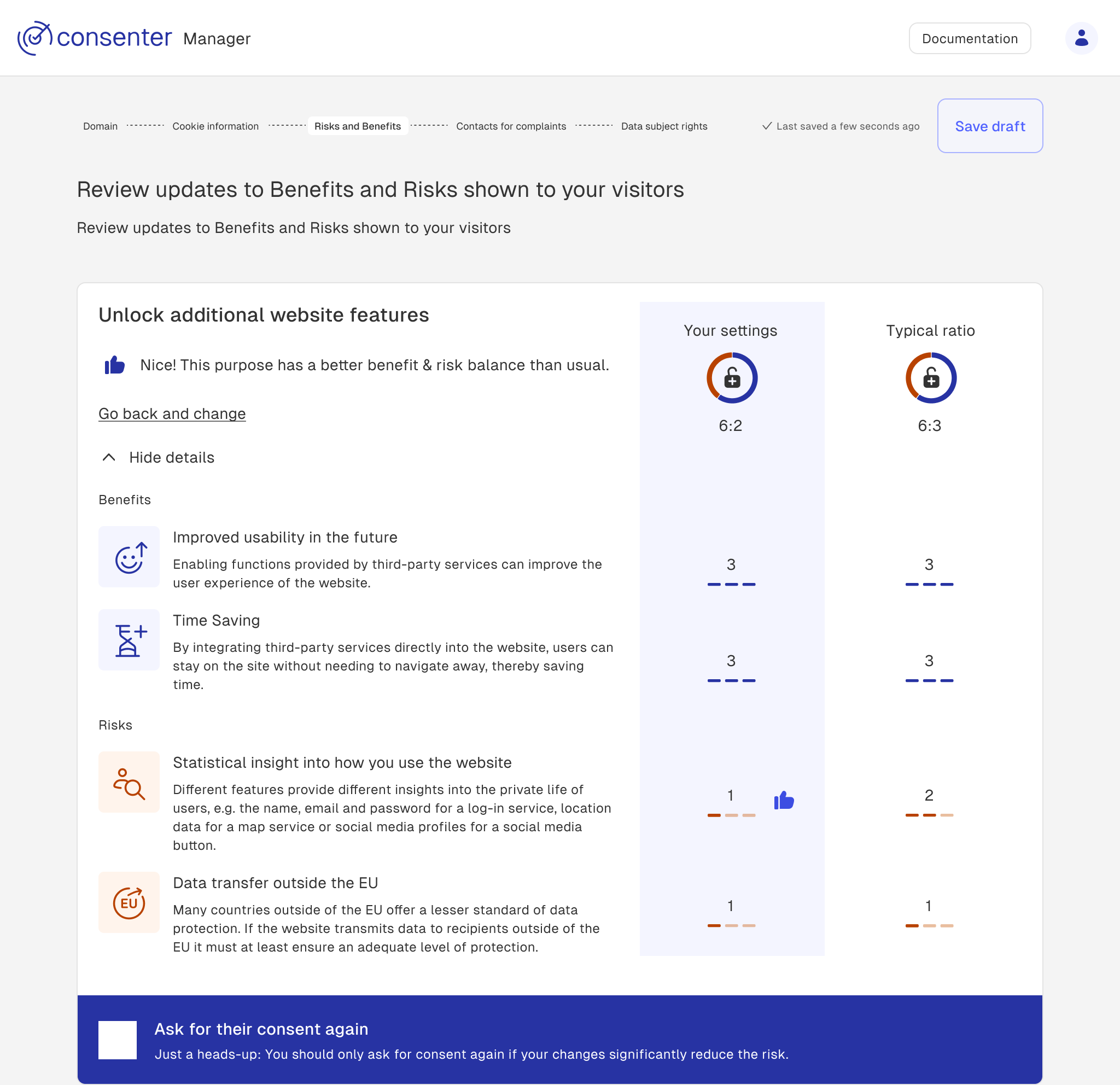
**If your user has not yet given their consent for a particular purpose, but the risk-benefit ratio has improved** since their last visit, you can ask this user for their consent again during their next visit.
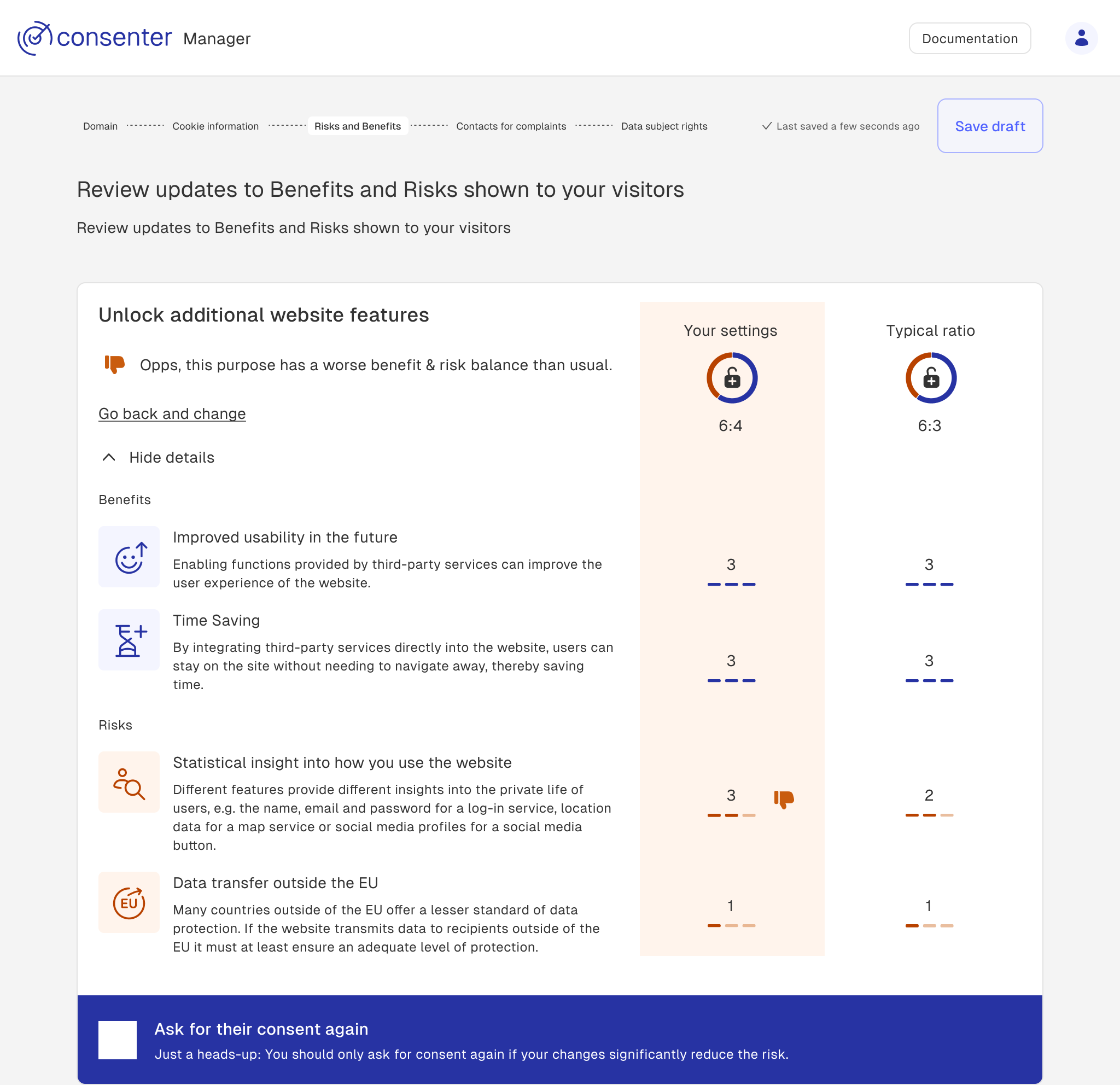
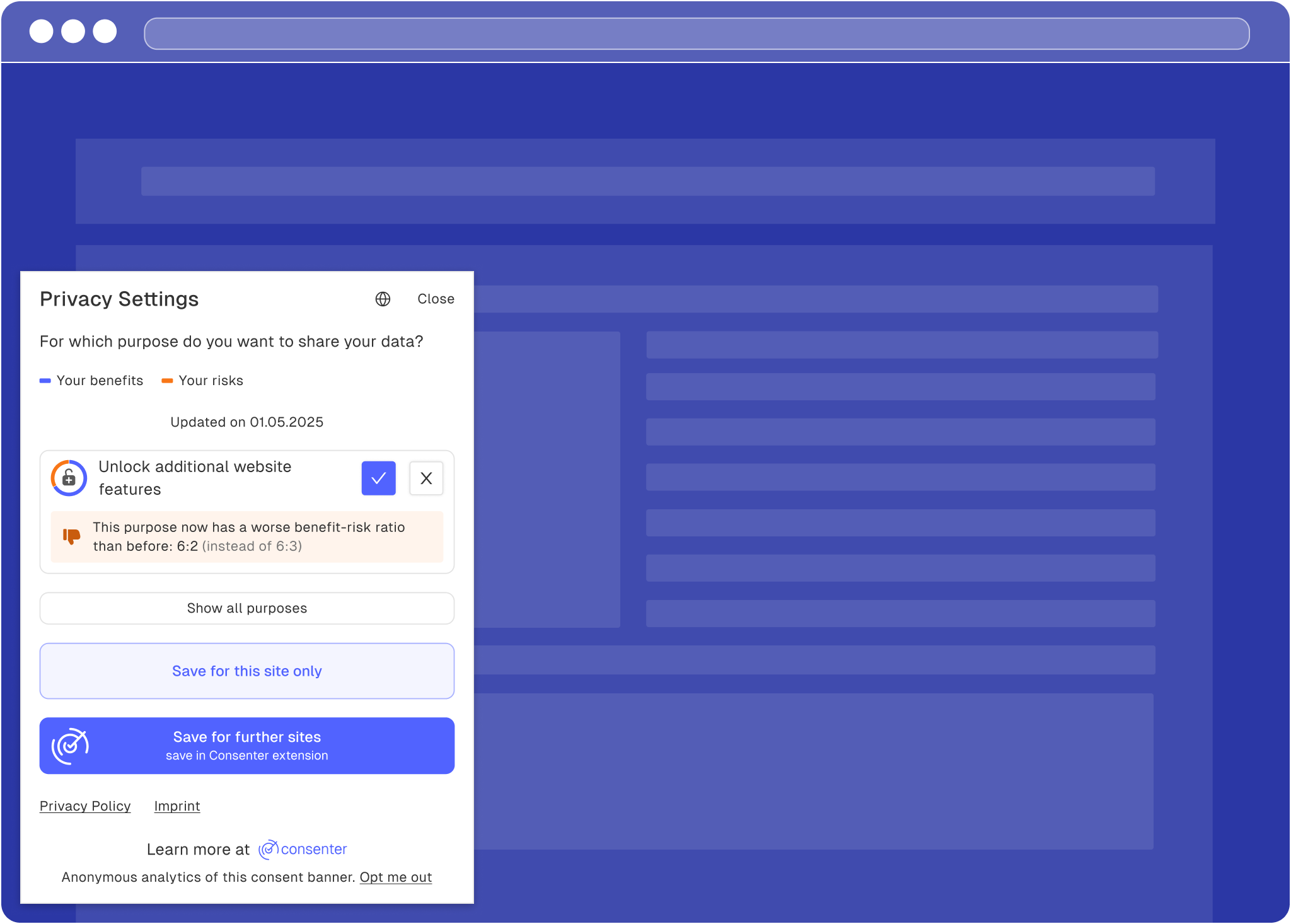
**If your user has already given their consent and the risk-benefit ratio has worsened**, you should inform them of this the next time they visit your website and give them the opportunity to withdraw their consent.
Purpose with better risk-benefit ratio in Consenter Manager
Purpose with worse risk-benefit ratio in Consenter Manager
**Important:** You remain responsible for correctly implementing data
protection law, and we simply help you do so as best we can (in fact, much
better than other CMPs do). That is why, in our current version, we give you
the choice of whether you want to inform your users again in the second and
third aforementioned situations and ask them to make a new decision. Please do
not abuse your users' trust, especially in the third case, and allow them to
make a new decision.
### Communicating new risks [#communicating-new-risks]
We will communicate the changes to the risk-benefit ratios to your user the next time they visit your website. Depending on whether they are a Consent Agent user or not, we can display the change to them accordingly.
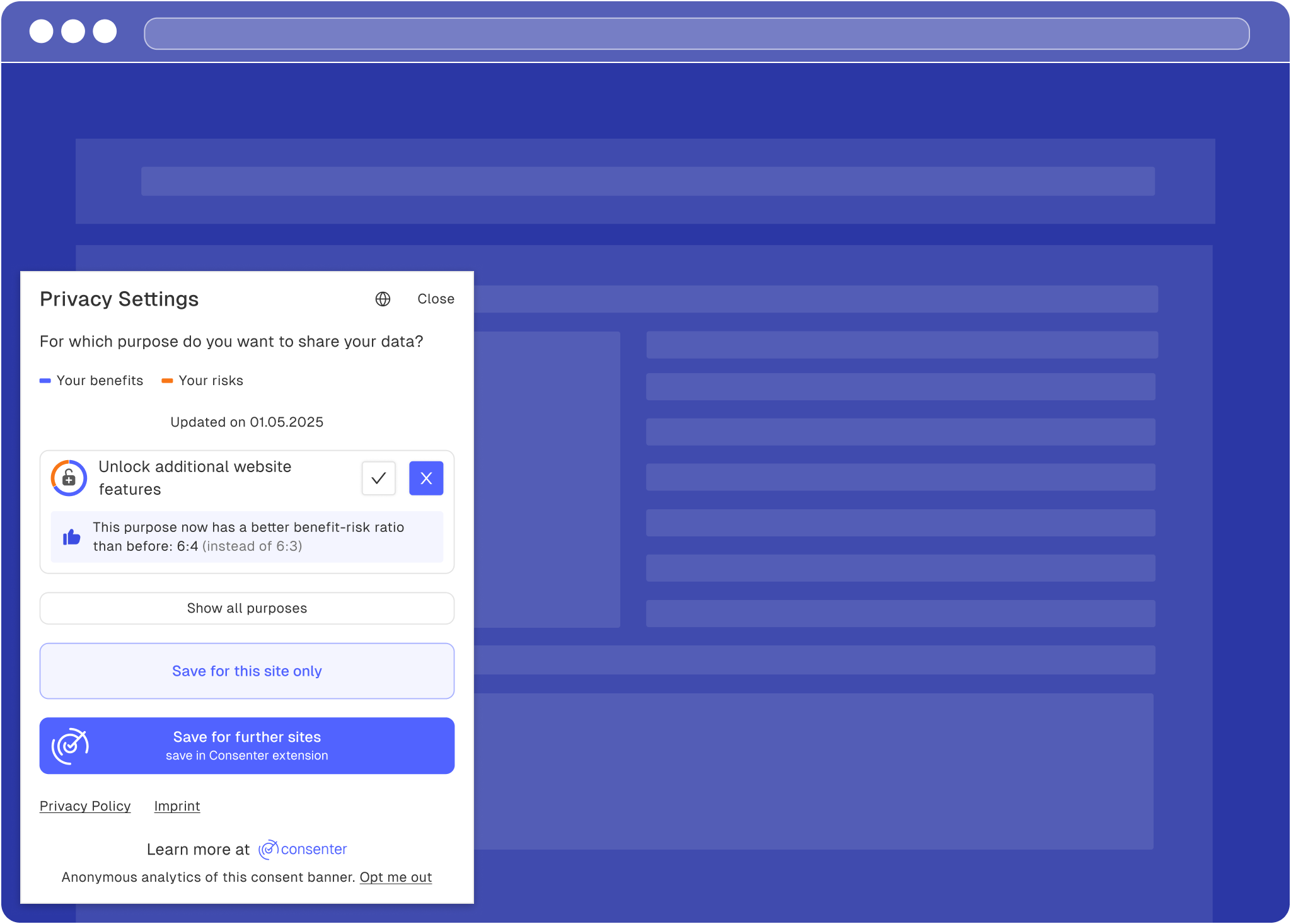
**Your users have not yet consented for a specific purpose. Since their last refusal, you have significantly reduced the risks. As the risk-benefit ratio has improved**, you can ask them to make a new decision.
A purpose with better risk-benefit ratio
A purpose with better risk-benefit ratio for non-CA users
**Your users have consented for a specific purpose. Since their last consent, you have increased the risks. As the risk-benefit ratio has worsened**, you should inform your user and give them the chance to make a new decision.
A purpose with worsened risk-benefit ratio
A purpose with worsened risk-benefit ratio
# Configure Your Tools
URL: /tools-configuration
Risk configuration guides for third-party tools.
Below you will find configuration guides to help you set up third-party tools and map these configurations within the Consenter Manager when configuring your consent banner. We will continue to expand this collection with additional guides over time.
Consenter builds on an open and participatory development process, based on an open standard (see the Consent Standard ConStand, available at [www.tinyurl.com/ConStand](https://tinyurl.com/ConStand)).\*
One key area where we build on the involvement of our community is the creation and maintenance of the Risk Configuration Guides.
If no Risk Configuration Guide yet exists for a tool you use or provide, or if you believe any of our existing guides contain inaccuracies, please help improve this documentation using the contribution buttons below or on our website.
### Analytics [#analytics]
### Audio and Video Content [#audio-and-video-content]
### Maps [#maps]
### Social Media [#social-media]
### Personalisation and Advertising [#personalisation-and-advertising]
If you would like to contribute your own configuration guides or risk assessments for tools not yet covered, we encourage you to get in touch. We are working towards opening this documentation to the community, with the aim of sharing knowledge on data protection–friendly configurations of third-party technologies.
# Define the Data Categories
URL: /configuration/data-categories
Define processed data, storage periods and processing locations.
Select all data categories which are processed by each service provider.
If you have selected all data categories, click “edit” in order to specify how long the data is retained for (storage duration) and where the data is processed (storage location).
**Storage duration**
If the service provider has specified a maximum timeframe, after which any personal data is erased or fully anonymised, indicate this time frame (e.g. 6 months).
If the data is retained as long as necessary for achieving a given purpose (e.g. as long as a contract with the website visitor is active), select “until the purpose is fulfilled”.
If the storage duration is determined by law (e.g. tax‑relevant accounting records and invoices), select “legal storage period” and indicate the specific legislation.
**Storage location**
Select the countries to which personal data is transmitted. If the country is part of the European Union (EU) or European Economic Area (EEA), it is sufficient to select “EU/EEA”.
If a country lies outside the EU or EEA, you must indicate the legal basis on which this so‑called “third‑country transfer” takes place.
For many industrialised countries, the EU Commission has issued an “adequacy
decision” ([see
list](https://commission.europa.eu/law/law-topic/data-protection/international-dimension-data-protection/adequacy-decisions_en)),
warranting that the receiving country has a data protection level comparable
to that in the EU.
**Apply to all data categories**
As all data is usually processed in a similar way, tick the box “Apply to all data categories”.
If a particular data category has a different storage duration or storage location, you can adjust that category individually afterwards.
# Configure Your Banner
URL: /configuration
Get started with configuring your Consenter Cookie Banner.
Use the [Consenter Manager](https://manager.consenter.eu/) to configure your cookie banner.
Before you begin:
. Create a Consenter Manager account and choose the subscription that best fits your needs. If you're unsure which subscription is right for you, start with the free trial.
. Create a new site and enter your website's domain.
. Follow the configuration steps in this section to configure your banner.
. Use our [risk configuration guides](/tools-configuration) whenever you configure third-party tools.
# Select Your Purposes
URL: /configuration/purposes
Select the purposes that require consent on your website.
Under data protection law, consent must be obtained separately for each specific purpose of processing. The purpose of processing explains why and for what personal data will be used and is therefore the central reference point for an informed decision by data subjects. From the stated purpose you can derive which processing operations are necessary, which risks they pose for the fundamental rights of data subjects, and what benefits the processing provides – both for the website operator and for the data subjects themselves.
Depending on the purposes for which you want to process personal data, you must select one or more corresponding purposes in the Consenter Manager in order to obtain consent from your users. You can only select purposes that actually require consent. Processing that is strictly necessary for the basic functions of the website or for ensuring security does not require your visitors’ consent and only needs to be described in your privacy notice.
Choose one or more of the following purposes:
**1.**
Improve the service
You want to use analytics tools such as Matomo or GA4 to generate statistics on how visitors use your website (for example, pages viewed, clicks, scroll depth, time spent) and where they come from (for example, which other websites referred them or from which approximate region they access your site).
If you want to analyse the effectiveness of ads and marketing campaigns, you
should instead select the “Support marketing analytics” purpose, which also
covers general website analytics.
**2.**
Unlock additional website features
You may want to embed third‑party features on your website that process personal data from your visitors (e.g. videos, social media buttons, or maps), either to provide the requested service or for the provider’s own purposes.
If third‑party services process personal data for their own purposes (e.g.
advertising), you must also obtain consent for this additional purpose. Ensure
that the service is blocked from collecting personal data until the user has
provided consent. To achieve this, we recommend implementing [contextual
consent](/technical-integration/contextual-consent).
**3.**
Personalise the website
You want to adapt the content and appearance of your website to your visitors’ interests and preferences (for example, by displaying individually relevant content, display recommendations, or remember language settings).
**4.**
Support marketing analytics
You want to generate statistics of how visitors use your website to better understand how successful your marketing activities are (for example, which campaigns lead to visits or conversions) and which target groups you are reaching.
If you also engage in personalised advertising, the purpose “Customising
online ads” already includes marketing analytics. In this case, you can either
obtain consent for both purposes separately or rely solely on consent for
personalised advertising. It may be beneficial to request consent separately,
as statistical analytics typically achieves higher consent rates due to its
lower risk profile for website visitors.
**5.**
Receive marketing offers
You want to occasionally send visitors information about your activities, products, or services via email or other channels.
For this specific purpose, we recommend obtaining consent directly at the
point where you collect users’ contact details (e.g. email addresses) on your
website, rather than via the consent banner. If you obtain consent in this way
for direct communications, you do not need to select this purpose in the
consent banner.
**6.**
Receive personalised marketing offers
You want to send visitors offers, product recommendations, or information that are tailored to their individual interests and previous usage behaviour, so that they receive content that is as relevant as possible.
**7.**
Customise online ads (non-TCF)
You want to display ads on your website that are tailored to individual visitors, for example through group- or profile-based personalisation or retargeting based on their previous (shopping) behaviour, and to measure and improve the effectiveness of this advertising at the same time.
This purpose does not enable participation in the Transparency and Consent
Framework (TCF), nor does it cover data transmissions to the vendor network
defined within the TCF.
# Risk Overview Page
URL: /configuration/risk-overview
Review risks, benefits and changes to your configuration.
On this page, you are presented with a summary of the risks and benefits associated with each configured purpose. Your setup is compared both to the risk level of an average website and—if applicable—to the risks of your previous configuration.
If you are modifying an existing cookie banner, this page also functions as a control centre for the trigger system. This system allows you to notify returning visitors about increases in risk or to request consent again from users who previously refused, if you have reduced the data protection risks for them (see section [Changes in the Risk–Benefit Ratio](/maintenance#how-consenter-handles-changes)).
# Data Subject Rights
URL: /configuration/subject-rights
Review compliance requirements, preview and publish your banner.
This page provides an overview of the data subject rights you are required to grant, along with the steps needed to ensure full legal compliance. It is intended for informational purposes only.
By clicking “Publish,” you apply all changes to the banner that is currently live and implemented.
If the banner code has not yet been integrated into your website, the banner will only be deployed once the [technical implementation](/technical-integration/banner-integration) has been completed.
Before publishing, you can preview the banner to ensure that all purposes and required information have been included.
# Choose Your Tools
URL: /configuration/tools
Select and configure the tools used on your website.
Many websites rely on external tools to provide specific functions, such as web analytics, marketing, embedded videos, maps, or social media content.
These tools are provided by third‑party service providers. Selecting appropriate tools and configuring them to match your needs has a significant impact on your overall data protection footprint.
It is important that you know which tools you use and how you have configured them on your website. Only then can you make these settings transparent to your website visitors by configuring each service provider in the Consenter Manager.
If you are unsure how to configure a tool and how to mirror this configuration
in the Consenter Manager, we offer [risk configuration
guides](/tools-configuration) that support you in two ways: 1. They help you
configure the tool in line with the data minimisation principle (i.e.
processing only the personal data necessary for your purposes). 2. They show
you how to reflect this configuration in the Consenter Manager so that your
website visitors are correctly informed about the processing.
## Choose External Service Provider or Disclose Own Processing [#choose-external-service-provider-or-disclose-own-processing]
In the second column, select the service provider you use for the purpose you have chosen.
If your service provider is not yet listed, add it manually as a new service provider.
If you process data without (or only partly with) external tools, add yourself as a service provider.
## Add service provider information [#add-service-provider-information]
By clicking “edit” you open the context window to submit legally required information about the tool you use.
**Legal role**
If you only process data on your own servers, select **“self hosted”**.
If you transmit data to the service provider on the basis of a data processing agreement, which limits the service provider to your own processing purposes, select **“processor”**.
This is the most likely scenario for services which provide analytics only.
If you transmit data to a service provider, which processes personal data for its own purposes (e.g. advertising), select **“controller”**, if you process personal data for shared purposes on the basis of a joint controller agreement, select **“joint controller”**.
This is the most common scenario for external service providers embedded on
your website and in the context of personalised advertising. For some
services, processing for the provider’s own purposes is enabled by default.
Make sure to deactivate this option when configuring the service if you do not
require this functionality.
**Tracking Method**
Select how your website recognises returning visitors. The available tracking methods range from low risk (no tracking or single-session) to high risk (third‑party cross‑device tracking).
**Personalisation Model**
Specify whether, and in what way, data is used for personalisation.
You can save time by applying these settings to all other tools within this
purpose by selecting “Apply to all data recipients”.
# Privacy Badges
URL: /risk-assessments/badge-attribution
Understand how Consenter attributes the privacy+ and caution badge.
This framework for attributing badges to third party service providers (TPP) is being constantly adapted according to the evolving state of technology, the changing legal framework, and most importantly, feedback from technology providers, experts and authorities.
We want to keep the process as open as possible. If you disagree with parameters of our attribution framework, please let us know - either by contacting us directly or opening a new issue in our GitHub repository.
***
## 1. Badge model [#1-badge-model]
### Privacy+ [#privacy]
A Privacy+ badge is assigned where the provider demonstrates a clearly privacy-friendly design and default configuration, does not process data for its own advertising or profiling purposes, performs strongly against tracking, profiling, and international transfer criteria, and does not trigger any red flags.
### No badge [#no-badge]
No badge is assigned where the provider presents a mixed or average privacy risk profile: not clearly problematic, but not sufficiently privacy-friendly by design or default to justify positive attribution.\
This is the default outcome for configurable services that can be deployed in a compliant manner but require standard controller due diligence and appropriate configuration.\
No badge is also assigned where insufficient information is available at the time of assessment.
### Caution [#caution]
A Caution badge is assigned where the provider triggers one or more red flags or otherwise presents clear indicators of elevated privacy risk, including own-purpose data use, intrusive tracking, problematic profiling practices, restrictive or manipulative consent mechanisms, opaque onward data sharing, or high-risk international transfers without adequate safeguards. This doesn't mean the service is not GDPR compliant. However website providers must configure these services carefully, in order to be fully GDPR compliant when using them.
***
## 2. Attribution method [#2-attribution-method]
### Upfront decision tree [#upfront-decision-tree]
Use this decision sequence before looking at the aggregate score:
. Are there one or more red flags?
* Yes → Caution.
* No → continue.
. Are domains B (tracking/profiling) and E (international transfers/government access) both strong?
* No → cannot receive Privacy+.
* Yes → continue.
. Is the provider’s overall profile consistently high across the core domains?
* Yes → Privacy+.
* No → continue.
. Is the provider mixed / average risk, with no red flags and no clearly severe risk indicator?
* Yes → No badge.
* No, but there are still concrete elevated risks → Caution.
This makes “no badge” the default outcome for providers that are usable and configurable but not notably privacy-preserving.
### Scoring model [#scoring-model]
Score each domain on a 0–2 scale:
* 2 = privacy-friendly
* 1 = mixed / average / configurable
* 0 = elevated risk / poor privacy posture
Domains and weighting:
* A = 1.0
* B = 1.5
* C = 1.0
* D = 1.0
* E = 1.5
* F = 1.0
* G = 1.0
* H = 1.0
### Attribution thresholds [#attribution-thresholds]
Use the following logic:
**Privacy+** only if:
* no red flags;
* B = ≥ 1;
* C = 2;
* E = 2;
* weighted average score ≥ 1.4;
* no domain scored 0 in A, B, C, D or E.
**Caution** if:
* any red flag is present; or
* weighted average \< 0.9; or
* two or more core domains among A, B, C, D, E score 0; or
* there is a concrete elevated risk pattern even without a formal red flag.
**No badge** if:
* no red flags;
* Privacy+ threshold not met;
* overall picture is mixed / average / configurable.
***
## 3. Red flags [#3-red-flags]
These should override the score and lead directly to Caution, because they indicate a clearly heightened compliance burden or systemic incompatibility with privacy-friendly deployment.
### Red flag 1 — Own advertising or cross-service profiling [#red-flag-1--own-advertising-or-cross-service-profiling]
The provider uses personal data for its own advertising, retargeting, audience building, or cross-service profiling, especially across unrelated customer contexts.\
This is a strong indicator that the provider is not acting merely on the controller’s behalf and materially increases intrusiveness.
### Red flag 2 — High-risk third-country exposure without meaningful mitigation [#red-flag-2--high-risk-third-country-exposure-without-meaningful-mitigation]
Personal data is processed in, remotely accessed from, or otherwise exposed to a high-risk third country, and the provider lacks meaningful supplementary measures.\
The EDPB expressly frames supplementary measures as necessary where the transfer tool alone does not ensure essentially equivalent protection.
### Red flag 3 — Broad onward sharing for others’ own purposes [#red-flag-3--broad-onward-sharing-for-others-own-purposes]
The privacy terms allow data sharing with “partners,” “affiliates,” or ecosystem participants for their own purposes, especially for analytics, advertising, or product enrichment.\
This makes purpose limitation and controller oversight much harder.
### Red flag 4 — Significant opacity [#red-flag-4--significant-opacity]
The provider does not disclose sufficient information on purposes, tracking technologies, transfer destinations, sub-processors, or retention periods, such that a controller cannot meaningfully assess compliance.
***
## 4. Detailed assessment criteria [#4-detailed-assessment-criteria]
### A. Role and purpose limitation [#a-role-and-purpose-limitation]
**Question:** Does the provider process data strictly on behalf of the customer, or also for its own purposes?
* **Score 2**
* Clear processor role for the relevant service.
* Processing is limited to delivering the customer-requested functionality, with narrowly defined exceptions (e.g. security, abuse prevention).
* No use of data for the provider’s own purposes (e.g. marketing, cross-customer analytics, profile enrichment).
* **Score 1**
* Predominantly processor model, but with limited own-purpose use (e.g. service improvement, aggregate analytics).
* Clauses are broad but not clearly excessive or abusive.
* Some ambiguity remains, but not to the level of a red flag.
* **Score 0**
* Data is used for the provider’s own purposes beyond what is strictly necessary.
* Blended or unclear controller/processor allocation.
* Own-purpose use materially alters the nature of the service relationship.
**Evidence points:**
* Data Processing Agreement (DPA).
* Privacy policy.
* Product and technical documentation.
* “How we use data” / “service improvement” clauses.
### B. Tracking, profiling, and advertising [#b-tracking-profiling-and-advertising]
**Question:** How intrusive is the service’s identifier, tracking, and profiling model?
* **Score 2**
* No non-essential tracking in the default EU deployment.
* No behavioural profiling.
* No advertising or ad-tech components.
* Analytics, if present, is aggregate or strongly minimised.
* **Score 1**
* Uses identifiers (e.g. cookies, SDKs), but these can be disabled or withheld without disproportionate effort.
* Limited profiling or telemetry for product analytics only.
* Configurable and not inherently incompatible with compliant deployment.
* **Score 0**
* Default deployment relies on non-essential tracking, persistent identifiers, fingerprinting, or profiling.
* Cross-site or cross-service tracking.
* Advertising or marketing functionality is structurally embedded.
**Caution indicator**\
Broad default tracking combined with difficult or manipulative consent gating may justify escalation, even without explicit ad-tech.
### C. Default settings and configurability [#c-default-settings-and-configurability]
**Question:** Are privacy-friendly settings the default, or does compliance depend on active reconfiguration?
* **Score 2**
* Defaults are privacy-friendly and data-minimising.
* Intrusive features are disabled by default.
* Configuration is granular, effective, and well documented.
* **Score 1**
* Defaults are neutral rather than privacy-friendly.
* Some telemetry or extended logging enabled by default.
* Compliant deployment is achievable, but requires active configuration.
* **Score 0**
* Intrusive features are enabled by default and difficult to disable.
* Key controls are missing or only partially effective.
* Compliant deployment depends on workarounds rather than supported settings.
### D. Data minimisation, retention, and deletion [#d-data-minimisation-retention-and-deletion]
**Question:** Does the service limit collection and retention to what is necessary?
* **Score 2**
* Limited and well-defined data categories.
* Clear, short, and purpose-bound retention periods.
* Deletion and export are supported and documented.
* Use of pseudonymisation or comparable techniques where appropriate.
* **Score 1**
* Moderate data collection.
* Retention periods exist but are longer than necessary or unevenly documented.
* Deletion is possible but partially manual or incomplete (e.g. logs, backups).
* **Score 0**
* Broad or excessive data collection by default.
* Retention is vague, undefined, or excessive.
* Deletion rights are difficult to exercise or operationally unclear.
### E. International transfers and government access [#e-international-transfers-and-government-access]
**Question:** What is the provider’s exposure to third-country transfers and access risks?
Assessment should distinguish between:
* EU/EEA or adequacy-based processing (Art. 45 GDPR).
* EU–US Data Privacy Framework participation.
* SCC-based transfers (Art. 46 GDPR).
* Technical and organisational supplementary measures.
* Exposure to foreign government access laws.
* **Score 2**
* Processing limited to EU/EEA or adequate jurisdictions; or
* Transfers are exceptional, well-controlled, and supported by strong technical safeguards (e.g. encryption, separation).
* No meaningful remote access from high-risk jurisdictions, or access risk is effectively mitigated.
* **Score 1**
* Some exposure to the US or another third country.
* Lawful transfer mechanism in place (e.g. DPF, SCCs).
* Supplementary safeguards exist but are not particularly strong.
* Overall risk is moderate but not clearly severe.
* **Score 0**
* Significant processing or access in high-risk third countries.
* Reliance primarily on contractual safeguards where technical measures would be expected.
* Lack of clarity regarding remote access, support access, or infrastructure chain.
**Attribution note**\
A US nexus does not automatically imply “Caution.”\
“No badge” may be appropriate for standard DPF/SCC setups without additional red flags.\
“Privacy+” typically requires a clearly stronger posture (e.g. EU-only processing or robust technical mitigation).
### F. Transparency and documentation [#f-transparency-and-documentation]
**Question:** Can the controller clearly understand and document the processing?
* **Score 2**
* Clear and consistent privacy notice and DPA.
* Public and specific sub-processor list.
* Transparent retention information.
* Sufficient technical documentation to support lawful deployment and DPIA.
* **Score 1**
* Documentation is available but partly generic or incomplete.
* Key elements can be inferred with effort.
* Sufficient for standard due diligence.
* **Score 0**
* Documentation is unclear, inconsistent, or overly generic.
* Material aspects of processing are omitted.
### G. Data subject rights and consent compatibility [#g-data-subject-rights-and-consent-compatibility]
**Question:** Can the service be deployed in a way that respects consent and data subject rights?
* **Score 2**
* Non-essential processing can be withheld until valid consent.
* Withdrawal of consent can be effectively implemented.
* Supports data subject rights (e.g. access, deletion, objection) in a usable manner.
* No structural undermining of user choice.
* **Score 1**
* Consent-compatible deployment is possible but requires integration effort.
* Rights handling exists but is partly manual or indirect.
* Some limitations, but no structural incompatibility.
* **Score 0**
* Consent gating is difficult or ineffective in practice.
* Withdrawal cannot be reliably enforced across data flows.
* Rights handling is materially impaired, especially due to own-purpose processing.
### H. Sub-processors and onward sharing [#h-sub-processors-and-onward-sharing]
**Question:** Is the processing chain transparent, limited, and controlled?
* **Score 2**
* Detailed and up-to-date sub-processor list.
* Roles, locations, and functions clearly identified.
* Onward sharing is strictly limited to service delivery.
* **Score 1**
* Sub-processors are disclosed, but descriptions are partly generic.
* Transfer pathways or roles are not fully clear.
* Onward sharing exists but appears operationally bounded.
* **Score 0**
* Broad, vague, or poorly disclosed onward sharing.
* Relevant sub-processors not identified.
* Use of unclear formulations (e.g. “partners and affiliates”) without specification.
***
## 5. Short-form checklist version [#5-short-form-checklist-version]
* Does the provider act only for the customer’s purposes?
* Does the provider use data for its own analytics, marketing, or product enrichment?
* Does the service set or read non-essential identifiers by default?
* Does the provider create behavioural or cross-service profiles?
* Is any ad-tech or marketing ecosystem involvement present?
* Are privacy-friendly defaults enabled out of the box?
* Can intrusive features be disabled with ordinary configuration?
* Are data categories and retention periods limited and documented?
* Are international transfers limited to EU/adequate locations, or otherwise strongly safeguarded?
* Is the provider exposed to foreign government access laws, and if yes, are meaningful mitigations in place?
* Are sub-processors and onward sharing transparently documented?
* Can the service be integrated in a way that respects consent and data subject rights?
**Interpretation:**
* Several “strong yes” answers to privacy-friendly questions, plus no red flags → candidate for Privacy+.
* Mixed answers, but no serious risk indicators → No badge.
* Any red-flag answer or strongly negative answer in tracking, profiling or transfer posture → Caution.
# Automated Risk Assessment
URL: /risk-assessments/risk-assessment
Understand how Consenter evaluates privacy risks and configurations.
The automated Risk Assessment provides the methodological basis for evaluating your website configuration - more specifically, the configuration of the technologies used to operate your website.
## Goal of the risk assessment [#goal-of-the-risk-assessment]
As a key management tool within Consenter Manager, the Risk Assessment shows you how your specific website configuration affects
* the data protection risks for your website visitors,
* your legal compliance and
* your website visitors’ willingness to give consent.
Within the Consenter Manager, you can systematically assess, compare and optimise the data protection-related settings of your website technologies.
## Legal grounding [#legal-grounding]
The risk assessment methodology is based on Article 25 of the GDPR (data protection by design and data protection by default) and Article 35 of the GDPR (data protection impact assessment). Both provisions require an assessment of the risks to the rights and freedoms of data subjects.
The implementation of this risk assessment methodology is based on a research and development process spanning over ten years, carried out in collaboration with European research institutions and data protection authorities. It combines data protection risk assessments with considerations on technical feasibility and clear communication.
## Assessed risk factors [#assessed-risk-factors]
The risk assessment takes into account, in particular:
* tracking methods used
* categories of personal data
* storage period
* storage location
* legal roles of third-party providers involved
* use and type of personalisation models
* purposes and specific nature of the processing
* context of data collection
Each selection option is assigned a weighted score. This weighting is based on its potential impact on fundamental rights such as privacy and informational self-determination, and is grounded in our research findings.
## Role of third-party providers [#role-of-third-party-providers]
Third-party technologies – such as Matomo or Google Analytics – are often central to the operation and further development of websites. However, different tools and configurations lead to different data protection implications. These depend, amongst other things, on the provider’s place of business, the data processed by default, and the respective purposes of processing.
## Automated assessment in Consenter Manager [#automated-assessment-in-consenter-manager]
The assessment process is fully integrated into the Consenter Manager.
Each configuration change has an immediate impact on the calculated risk–benefit ratio, which is visualised in the Risk Benefit Wheel—a graphical representation of this ratio. This allows you to see in real time how your settings influence the data protection assessment.
Many risks arise from the interaction of multiple factors and only become significant once certain thresholds are reached. These interdependencies are also reflected in the Risk Benefit Wheel.
## Risk configuration guides [#risk-configuration-guides]
For commonly used third-party technologies, we provide specific configuration guides. These typically include three levels of risk configurations:
* Low risk
* Medium risk
* High risk
These configurations span multiple settings and parameters. The guides give you a structured overview of the overall risk associated with different configuration options. When you implement your chosen settings in the Consenter Manager, the system automatically assigns the corresponding risk level to each individual option.
# Integrate Cookie Banner
URL: /technical-integration/banner-integration
Add the Consenter Banner to your website.
Before your Consenter Banner can appear on your website, you need to add a small script to your site. This script loads the banner.
**Attention: Do you want to integrate a consent banner or contextual consent?**
For some purposes, it is better to ask your end users for their consent via contextual consent rather than a consent banner. This applies in particular to additional website features, such as maps, videos or social media feeds, which you want to integrate into your website and which process your end users' data. See contextual consent guide →
## Step 1: Get your embed code [#step-1-get-your-embed-code]
Once your banner version is "active", the "Embed Code" button becomes available.
Click **Embed Code → Embed Consenter Banner** to find your embed code snippet.
It will look similar to this:
```html title="index.html" lineNumbers
```
Replace the placeholder with your own value:
`YOUR_DOMAIN_ID` → your Consenter domain ID (from **Sites → Your Site** in Consenter Manager)
## Step 2: Add the script to your website [#step-2-add-the-script-to-your-website]
Copy the embed code snippet and paste it into the `` section of your website.
Make sure it is placed before any third-party script that requires user
consent.
```html title="index.html" lineNumbers
...
```
**Next step: Set up your TPP integrations**
The embed script does **not** automatically block or enable third-party tools. For each TPP you use, you must add the TPP integration snippet (including the contextual consent snippet when needed) so it checks the banner's consent state before running. See TPP integration guide →
# Add Contextual Consent (optional)
URL: /technical-integration/contextual-consent
Block third-party content until consent is obtained and implement contextual consent for embedded services such as videos, maps, and social media features.
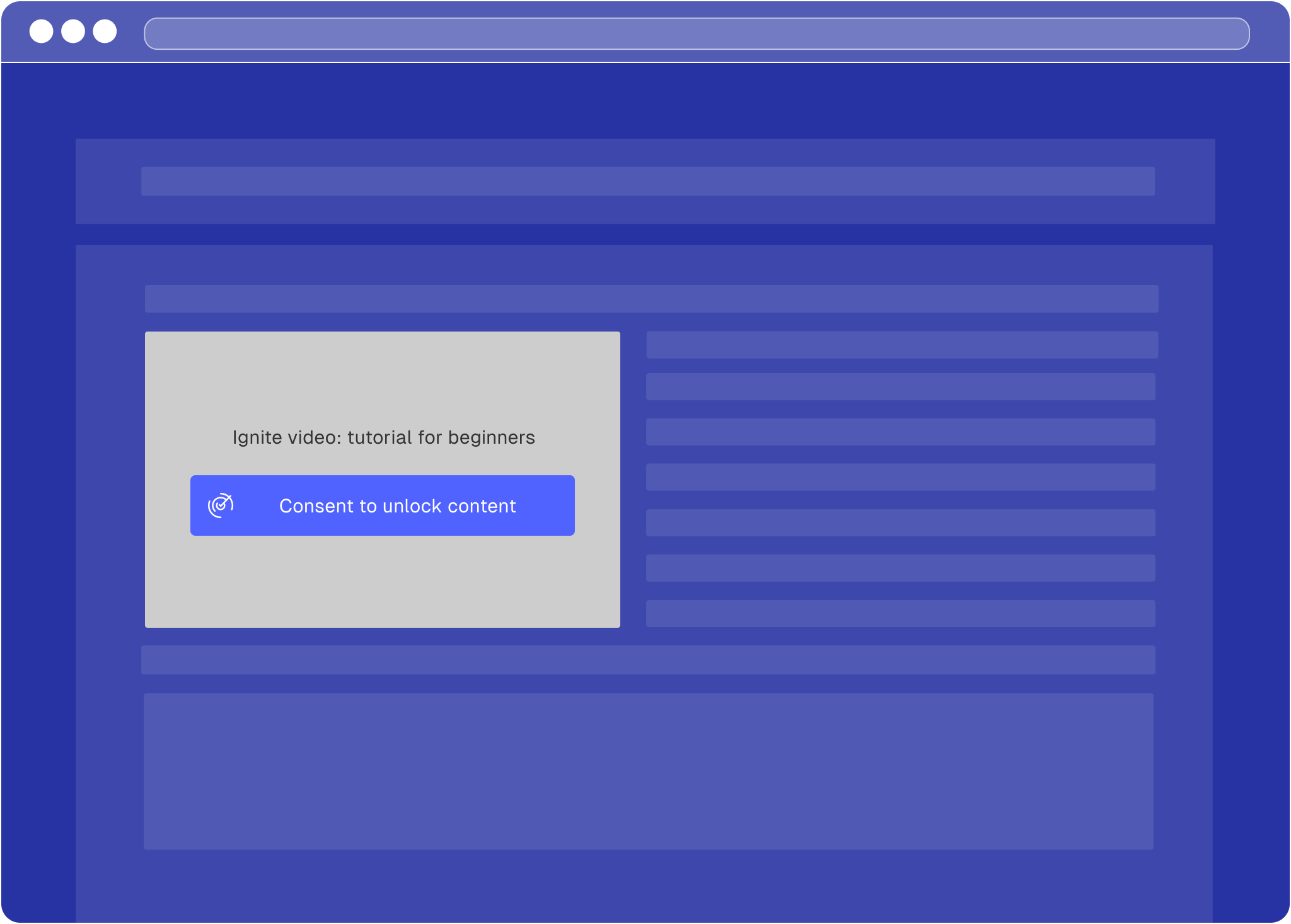
Third-party content—such as maps, videos, or social media features—often transmits your visitors’ personal data to the provider the moment it loads. You must prevent this until the visitor has consented. Contextual consent does exactly that: instead of asking for everything up front in the cookie banner, you keep a specific embed blocked and ask for consent right where the content appears, at the moment the visitor wants to use it.
In practice this means:
* The embed stays blocked—so no personal data reaches the provider—until the visitor consents.
* The visitor consents directly at the embed, which loads the content in place.
* Once that consent is recorded, the embed loads automatically for the visitor on their next visit, with no further prompt.
You can implement this with our ready-made consent gate, which handles the blocking and unblocking for you, or build your own gate on the Consenter API. Either way, start by working out which consent you need to collect.
## Choose your contextual consent type [#choose-your-contextual-consent-type]
Some third-party integrations process personal data solely to provide their
service, while others also use data for their own additional purposes (e.g.
advertising). The consent you need to collect — and therefore the type of
contextual consent you implement — depends on which applies to your provider.
The three scenarios below show when contextual consent is needed and which type
to use (type 1 or type 2).
**When does this apply?**
In a very limited number of cases, third-party content can be embedded on
your website without requiring visitor consent. This is possible within
the EU only where:
No consent is required according to the **ePrivacy Directive**, because
* no data is stored or accessed on the visitors’ device
* or this is “strictly necessary” for the provision of your website
**AND**
No consent is required according to the **GDPR**, because any processing of
personal data can be based on legitimate interests (Art. 6 (1)(f) GDPR) or
another legal basis.
No action is required in these scenarios. Refer to our [configuration
guide](/tools-configuration) for third party providers, to find
out where consent-free embedding is possible.
**When to choose this?**
If you want to embed content from a third party provider which processes
data solely to **deliver the content** to your website visitors (and not
other purposes), this typically still involves
* storing or accessing information on visitors' devices
* very limited personal data processing.
In these common scenarios, you must **block** the content by default,
allowing visitors to decide whether to transmit data to the third party by
means of a simple “unblock” button.
**When to choose this?**
If you want to embed content from a third party provider which processes
data also for **other purposes** beyond delivering the content to your
website visitors, you must acquire user consent for these additional
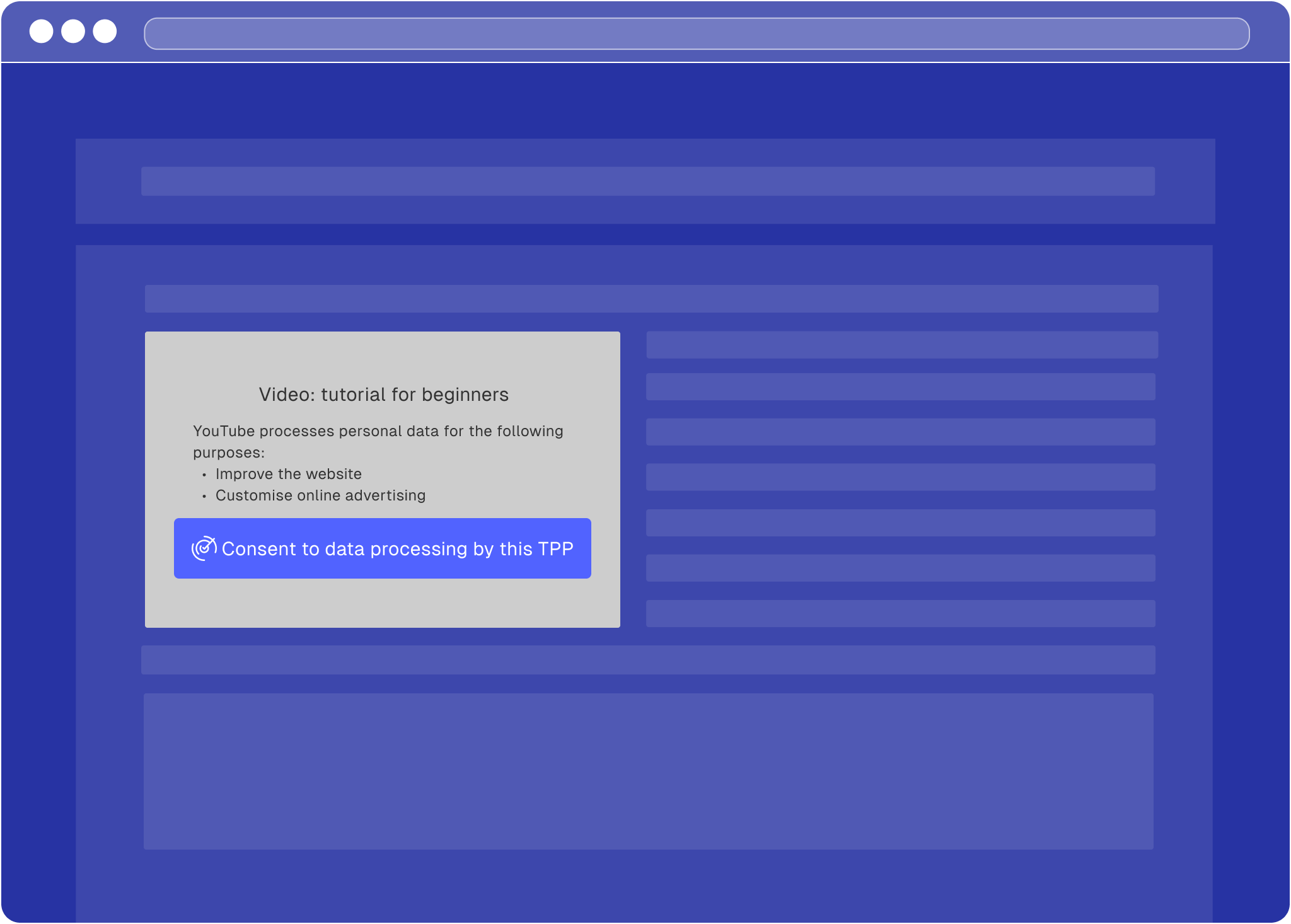
purposes through the contextual consent.
If this is the case, you must
* block the content by default,
* specify the additional purposes, and
* allow visitors to decide whether they consent to these additional
purposes.
If unsure whether your TPP requires contextual consent of type 1 or type 2,
check out our [TPP configuration guides](/tools-configuration) or
refer to the privacy policy or documentation of the TPP.
## Add contextual consent to your site [#add-contextual-consent-to-your-site]
Once you know which consent type you need, embed the provider behind a consent
gate. There are two ways to do this:
* **[Built-in consent gate](#built-in-consent-gate)** — add our script and a few
HTML attributes, and Consenter renders the gate for you. This is the quickest
option and the right default for most sites.
* **[Custom integration](#custom-integration)** — load only the banner script,
block the content yourself, and drive consent through the Consenter API. Choose
this when you want full control over the gate’s look and behaviour.
Both methods identify the provider with the same **Service ID** and **Purpose
IDs** from your banner, so you can switch between them later without
reconfiguring — see [Finding your Service and Purpose IDs](#finding-your-service-and-purpose-ids).
Contextual consent only works if your **Consenter Banner is configured
correctly** in the Consenter Manager: the **purposes used by the third-party
provider must match the purposes enabled in your banner**. If they do not
match, contextual consent cannot be applied.
### Built-in consent gate [#built-in-consent-gate]
Add the two scripts below, then mark up the embed you want to gate. Consenter
blocks the content, renders its consent gate in its place, and unblocks the
content once the visitor consents (or immediately, if they already have).
. **Add the contextual consent scripts**
Place the contextual consent script **at the top of the `` section**:
```html title="index.html" lineNumbers
```
. **Add Consenter attributes to your embed**
Remove the original `src` attribute, and add Consenter data attributes inside
the `
```
The older per-purpose attributes
(`data-consenter-tpp-purpose-improve-the-service`,
`data-consenter-tpp-purpose-marketing-analytics`,
`data-consenter-tpp-purpose-customise-ads`) still work but are deprecated and
log a console warning. Migrate to a single `data-consenter-purpose-ids`
attribute.
**What each attribute does (quick reference)**
| Attribute | What it does | Notes |
| ---------------------------------- | -------------------------------------------------------------------- | ------------------------------------------------------------------------------------------------------------------------------------------------------------- |
| **`data-consenter-tpp-id`** | Tells Consenter which TPP this embed belongs to. | Required. The service ID from your banner — see [Finding your Service and Purpose IDs](#finding-your-service-and-purpose-ids). |
| **`data-consenter-tpp-label`** | Display name shown to the user (e.g., “YouTube video”). | Required. Use something users immediately understand. |
| **`data-consenter-content-url`** | The URL that loads *after* the user unblocks / consents. | Required. Usually the original iframe/embed `src`. Remove the original `src` attribute so the content is blocked before consent. |
| **`data-consenter-content-label`** | Short description of the specific content (e.g., “Product Demo”). | Required. Helps users understand what they are enabling. |
| **`data-consenter-language`** | Sets the language of the contextual consent UI. | Optional. Supports `EN` and `DE`. If missing, the browser language is used when it is English; otherwise German is used. |
| **`data-consenter-purpose-ids`** | Comma-separated list of the purpose IDs this flow needs consent for. | Required. Declare exactly the purpose(s) your case needs — one or several. See [Finding your Service and Purpose IDs](#finding-your-service-and-purpose-ids). |
### Custom integration [#custom-integration]
The built-in gate renders Consenter’s own UI over the blocked content. If you
want full control over the look and feel — your own “show the content” button,
styling, and layout — you can build the gate yourself and drive consent through
the Consenter API instead.
In this mode you load **only** the banner script (not `contextual-consent.js`),
block the third-party content yourself, then:
* call [`grantContextualConsent(tppId, purposeIds)`](/technical-integration/javascript-api#grantcontextualconsenttppid-purposeids)
when the user opts in, and
* [`subscribe`](/technical-integration/javascript-api#subscribecallback-selector) (or
[`has`](/technical-integration/javascript-api#hasselector)) to reveal the content once it is consented.
See the [JavaScript API](/technical-integration/javascript-api) for the full method reference.
```html title="index.html" lineNumbers
```
#### Example [#example]
This example keeps a video blocked behind a custom button, grants consent on
click, and reveals the content once consent is saved. The same `subscribe`
callback also reveals the content immediately for visitors who have already
consented.
```html title="index.html" lineNumbers
This video is provided by Vimeo and may process your data.
```
### Finding your Service and Purpose IDs [#finding-your-service-and-purpose-ids]
Both integration methods need your provider’s **Service ID** and the **Purpose
IDs** it requires. Find them in the [Consenter Manager](https://manager.consenter.eu):
. Select your website.
. Open your **active** banner version to reach the Technologies Configuration
page.
. Hover over the service or purpose label and click the copy button in the
tooltip.
Declare exactly the purpose(s) your case needs — one or several. The standard
purpose IDs are:
| Purpose | Purpose ID |
| ---------------------------------- | --------------------- |
| Unlock additional website features | `additional-features` |
| Improve the service | `service-improvement` |
| Support marketing analytics | `marketing-analytics` |
| Customise online ads | `customise-ads` |
# Update Imprint
URL: /technical-integration/imprint
Ensure contact details and transparency information are available.
Please ensure that all processing of personal data is also described in your privacy policy. The privacy policy must be clearly visible and easily accessible to users on every page and subpage of your website (no more than two clicks).
Make sure to include your address and contact details in the privacy policy or your imprint, so that users can identify you as the data controller and contact you regarding data protection matters.
# JavaScript API
URL: /technical-integration/javascript-api
A small browser API on window.consenter for working with consent programmatically
The Consenter banner exposes a small browser API on `window.consenter` for reading
consent, reacting to changes, granting contextual consent, and opening the banner
from your own UI.
## Waiting for the API [#waiting-for-the-api]
`window.consenter` is set once the banner script has loaded, which may be after
your own code runs. Guard with the `consenter:ready` event:
```js lineNumbers
function start() {
// window.consenter is ready here
}
if (window.consenter) {
start();
} else {
document.addEventListener("consenter:ready", start);
}
```
## get() [#get]
Takes no arguments and returns the current consent state synchronously:
## subscribe(callback, selector?) [#subscribecallback-selector]
Runs `callback` with the current state and again on every change, and returns
a function that removes the subscription.
Omit the `selector` to receive the full `ConsentRecord`. Pass one to watch a
single service instead:
The shape of `purposeIds` decides what the callback receives:
* `purposeIds: "service-improvement"` → `boolean`, `true` only when that
purpose is granted for the service.
* `purposeIds: ["service-improvement", "customise-ads"]` →
`Record`, e.g.
`{ "service-improvement": true, "customise-ads": false }`.
```js lineNumbers
const unsubscribe = window.consenter.subscribe(
function (granted) {
if (granted) showContent();
},
{ serviceId: "YOUR_SERVICE_ID", purposeIds: "YOUR_PURPOSE_ID" },
);
```
## has(selector) [#hasselector]
The one-shot version of `subscribe`: evaluates the selector once,
synchronously, against the current state:
**Returns** what `subscribe` would pass to its callback: `boolean` for a single
purpose ID, `Record` for an array.
```js lineNumbers
if (
window.consenter.has({
serviceId: "YOUR_SERVICE_ID",
purposeIds: "YOUR_PURPOSE_ID",
})
) {
showContent();
}
```
## grantContextualConsent(tppId, purposeIds) [#grantcontextualconsenttppid-purposeids]
Grants consent for a single service across the given purposes, without
re-opening the banner. See [Contextual Consent](/technical-integration/contextual-consent#custom-integration)
for the full custom-UI flow.
**Returns** `"success"`, or a validation error string. The consent is saved
asynchronously — use `subscribe` or `has` to react once it lands.
## banner.open() [#banneropen]
Opens the cookie banner from your own UI — typically a "Cookie settings" link
in your footer that gives visitors a route back into their consent choices.
Takes no arguments:
```html
```
## consenter:ready [#consenterready]
Dispatched on `document` once `window.consenter` is available — see
[Waiting for the API](#waiting-for-the-api).
## Deprecated [#deprecated]
Everything here keeps working but logs a console warning and will be removed in
a future major release.
* **`subscribe(callback, identifier[, purposeId])`** — the string-argument
forms. Use a selector instead: `subscribe(callback)` for the full record, or
`subscribe(callback, { serviceId, purposeIds })` for a service. The string
forms still return `"success"` instead of an unsubscribe function.
* **`unsubscribe(identifier)`** — only removes string-identifier
subscriptions. Call the function returned by `subscribe` instead.
* **`data-consenter-tpp-purpose-*` attributes** — the per-purpose flags on
[contextual consent](/technical-integration/contextual-consent) embeds
(`…-improve-the-service`, `…-marketing-analytics`, `…-customise-ads`).
List the purposes in a single `data-consenter-purpose-ids="id1,id2"`
attribute instead.
# Update Privacy Policy
URL: /technical-integration/privacy-policy
Add required Consenter information to your privacy policy.
## Text snippet for your privacy policy [#text-snippet-for-your-privacy-policy]
When using our consent banner, you must inform your website visitors about how their consent decisions are being processed. We therefore advise you to include the following text block in your privacy policy:
```text
Consenter Cookie Banner by Law & Innovation Technology GmbH
To collect and process your data protection consents, we use the Consenter Cookie Banner service provided by Law & Innovation Technology GmbH (L&I). Your consents are stored:
1. in your browser as a cookie to check whether you have already given us your consent, so that we no longer need to display the cookie banner to you, and
2. in our consent store provided by L&I, in order to prove the lawfulness of processing your personal data.
1. Collected Data
Your consent record contains:
- The build version of the consent banner at the time of consent.
- The domain you have consented to "example.com" along with a randomly generated domain ID.
- Date and time of consent.
- A randomly generated consent record ID (no user ID!) and, if consents change, the prior record ID. This way we make sure that no processing is based on your "expired" consent, for example if you have withdrawn prior consent.
- The purposes and respective third party services for which consent has been given or withdrawn.
- "Trigger" in order to monitor whether risks have increased or decreased when you revisit the website compared to the time you originally gave consent. This ensures that your consent is invalidated if the website begins to use more privacy-intrusive technologies.
2. Processing & Storage
Consent records are stored as encrypted, origin-bound cookies (SameSite=Strict) in your browser, accessible only by this website via JavaScript. No third-party access. L&I also stores consent records centrally on AWS (sub-processor) solely for proof of lawful processing. No user IDs or refusals are retained, preventing user profiling. Data is secured against unauthorised access.
3. Retention
Cookies expire after 400 days or upon browser cache clearance.
4. Identifiability
The data is weakly identifying across visits, as Consent IDs and timestamps could in theory allow a user to be recognised across multiple visits to one single website (never across multiple websites). The link is provided here for the benefit of the user, as we, as the website provider, must recognise that your previous consent records are obsolete and no longer valid. The consent records themselves provide only minimal insight into your private life (visiting a single website at a single point in time), as they are not tied to a user ID. They are never used for anything beyond managing your consent.
```
# Criteo
URL: /technical-integration/third-party-tools/criteo
## Prerequisites [#prerequisites]
Before starting, you'll need:
* Your Criteo Partner ID (also called Account ID)
* Product IDs that match your Criteo product catalogue
Find your Partner ID in your Criteo Commerce Growth Dashboard under Assets →
Events Tracking. It's a 5-digit number.
## Integrate Criteo with Consenter [#integrate-criteo-with-consenter]
**Important**: Before using this code, verify that the service ID and purpose
ID values are up to date. These IDs are specific to your Consenter
configuration. To find the correct IDs, go to [Consenter
Manager](https://manager.consenter.eu) → Your Site → Active Banner → Hover
over the service and purpose labels and click the copy button in the tooltip.
See the [Control Third Party Data Processing](/technical-integration/third-party-tools) page for detailed
instructions.
Copy the code below and paste it into your website's `` section.
Replace the placeholders with your own values:
* `YOUR_SERVICE_ID` → Your Criteo service ID from Consenter Manager
* `YOUR_PURPOSE_ID` → Your purpose ID from Consenter Manager
* `YOUR_PARTNER_ID` → Your 5-digit Criteo Partner/Account ID
```html title="index.html" lineNumbers
```
Criteo is now connected to Consenter.
# eTracker
URL: /technical-integration/third-party-tools/etracker
eTracker tracks in cookie-less mode by default without requiring consent (GDPR
compliant). This integration enables cookies only when users consent,
providing enhanced tracking. Do not block the eTracker script itself.
## Prerequisites [#prerequisites]
Before starting, you'll need:
* Your eTracker account key (also called "secure code")
* Your website domain name
Find your account key in your eTracker dashboard under Integration → Tracking
Code, or in Account → Account Key. It's an alphanumeric string like "ABC123".
## Integrate eTracker with Consenter [#integrate-etracker-with-consenter]
**Important**: Before using this code, verify that the service ID and purpose
ID values are up to date. These IDs are specific to your Consenter
configuration. To find the correct IDs, go to [Consenter
Manager](https://manager.consenter.eu) → Your Site → Active Banner → Hover
over the service and purpose labels and click the copy button in the tooltip.
See the [Control Third Party Data Processing](/technical-integration/third-party-tools) page for detailed
instructions.
Copy the code below and paste it into your website's `` section.
Replace the placeholders with your own values:
* `YOUR_SERVICE_ID` → Your eTracker service ID from Consenter Manager
* `YOUR_PURPOSE_ID` → Your purpose ID from Consenter Manager
* `YOUR_ACCOUNT_KEY` → Your eTracker account key
* `yourdomain.com` → Your website domain (e.g., example.com)
```html title="index.html" lineNumbers
```
eTracker is now connected to Consenter.
# Google Analytics 4
URL: /technical-integration/third-party-tools/google-analytics
## Prerequisites [#prerequisites]
Before starting, you'll need:
* A Google Analytics 4 Measurement ID (format: G-XXXXXXXXXX)
To find your Measurement ID: Sign in to Google Analytics → Admin → Data
Streams → Select your web stream → Find the Measurement ID at the top right.
## Integrate Google Analytics 4 with Consenter [#integrate-google-analytics-4-with-consenter]
**Important**: Before using this code, verify that the service ID and purpose
ID values are up to date. These IDs are specific to your Consenter
configuration. To find the correct IDs, go to [Consenter
Manager](https://manager.consenter.eu) → Your Site → Active Banner → Hover
over the service and purpose labels and click the copy button in the tooltip.
See the [Control Third Party Data Processing](/technical-integration/third-party-tools) page for detailed
instructions.
Copy the code below and paste it into your website's `` section.
Replace the placeholders with your own values:
* `YOUR_SERVICE_ID` → Your Google Analytics service ID from Consenter Manager
* `YOUR_PURPOSE_ID` → Your purpose ID from Consenter Manager
* `G-XXXXXXXXXX` → Your Google Analytics 4 Measurement ID
```html title="index.html" lineNumbers
```
Google Analytics 4 is now connected to Consenter.
# Control Third Party Data Processing
URL: /technical-integration/third-party-tools
Control third-party data processing based on users' consent decisions.
You must ensure that no personal data is transmitted to service providers and no cookies are set before website visitors have given consent. Since most third-party tools collect personal data by default, this requires blocking their scripts from running until visitors have provided consent via the cookie banner.
To integrate these tools in a compliant way, please follow the integration guides below. For some services, we offer specific guides to simplify implementation and pre-consent blocking. For all other tools, a general integration guide is provided.
Consenter builds on an open and participatory development process, based on an open standard (see the Consent Standard ConStand, available at [www.tinyurl.com/ConStand](https://tinyurl.com/ConStand)).\*
One key area where we build on the involvement of our community is the creation and maintenance of the specific technical integration guides.
If no Technical Integration Guide yet exists for a tool you use or provide, or if you believe any of our existing guides contain inaccuracies, please help improve this documentation using the contribution buttons below or on our website.
## Integration guides [#integration-guides]
For the following services, we provide step-by-step integration guides:
## Custom integration [#custom-integration]
If your service is not listed above, you can integrate it manually using the Consenter API.
### How it works [#how-it-works]
Once the Consenter script is loaded, you can use `window.consenter.subscribe()` to listen for consent changes for any service.
The Consenter API may not be available immediately when your script runs.
Always listen for the `consenter:ready` event on the `document` to know when
`window.consenter` is ready. If the API is already loaded, you can call it
directly. The code examples below show the recommended pattern.
```javascript title="index.html" lineNumbers
function subscribeToConsenter() {
window.consenter.subscribe(
function (hasConsent) {
if (hasConsent) {
// Enable the service
} else {
// Disable the service
}
},
{ serviceId: "SERVICE_ID", purposeIds: "PURPOSE_ID" }, // [!code highlight]
);
}
if (window.consenter) {
subscribeToConsenter();
} else {
document.addEventListener("consenter:ready", subscribeToConsenter);
}
```
**Parameters:**
* **Callback function**: Runs with the current consent state right away and again
on every change — `true` when the service is granted for the selected
purpose(s), `false` otherwise
* **Selector**: Anchors the subscription to your service. `purposeIds` takes
one purpose ID as a string, or several as an array — with an array the
callback receives an object keyed by purpose ID instead of a boolean
`subscribe` returns a function that removes the subscription, and
`window.consenter.has(selector)` answers the same question once, synchronously.
See the [JavaScript API](/technical-integration/javascript-api) for the full reference.
### Finding your service and purpose IDs [#finding-your-service-and-purpose-ids]
To find the correct IDs for your integration:
. Go to [Consenter Manager](https://manager.consenter.eu)
. Select your website
. Click on your **active** banner version in the table
. You'll see the **Technologies Configuration** page with all your configured purposes, services, and data categories
. **To find the Purpose ID**: Hover over the purpose label (e.g., "Improve the website") and click the copy button in the tooltip
. **To find the Service ID**: Hover over the service label (e.g., "Google Analytics") and click the copy button in the tooltip
. Use both IDs in your integration code
### Example [#example]
Here's a complete example showing how to integrate any service:
```html title="index.html" lineNumbers
```
Consult your service's documentation for the specific methods to enable and disable tracking or functionality.
# Matomo
URL: /technical-integration/third-party-tools/matomo
If you're using cookieless tracking with Matomo, you can skip this guide.
## Prerequisites [#prerequisites]
Before starting, you'll need:
* Your Matomo instance URL (example: `https://analytics.yoursite.com`)
* Your Matomo site ID (found in Matomo admin panel)
## Integrate Matomo with Consenter [#integrate-matomo-with-consenter]
**Important**: Before using this code, verify that the service ID and purpose
ID values are up to date. These IDs are specific to your Consenter
configuration. To find the correct IDs, go to [Consenter
Manager](https://manager.consenter.eu) → Your Site → Active Banner → Hover
over the service and purpose labels and click the copy button in the tooltip.
See the [Control Third Party Data Processing](/technical-integration/third-party-tools) page for detailed
instructions.
Copy the code below and paste it into your website's `` section.
Then replace the following placeholders with your own values:
* `YOUR_SERVICE_ID` → Your Matomo service ID from Consenter Manager
* `YOUR_PURPOSE_ID` → Your purpose ID from Consenter Manager
* `YOUR_MATOMO_URL` → your Matomo instance URL
* `YOUR_SITE_ID` → your site ID from Matomo
```html title="index.html" lineNumbers
```
Matomo is now connected to Consenter.
# Optimizely
URL: /technical-integration/third-party-tools/optimizely
## Prerequisites [#prerequisites]
Before starting, you'll need:
* Your Optimizely Project ID
To find your Project ID, log in to Optimizely, go to Settings >
Implementation, and look for the 8-digit number in your snippet URL. For
example, in `https://cdn.optimizely.com/js/12345678.js`, your Project ID is
`12345678`.
## Integrate Optimizely with Consenter [#integrate-optimizely-with-consenter]
**Important**: Before using this code, verify that the service ID and purpose
ID values are up to date. These IDs are specific to your Consenter
configuration. To find the correct IDs, go to [Consenter
Manager](https://manager.consenter.eu) → Your Site → Active Banner → Hover
over the service and purpose labels and click the copy button in the tooltip.
See the [Control Third Party Data Processing](/technical-integration/third-party-tools) page for detailed
instructions.
Copy the code below and paste it into your website's `` section.
Replace the placeholders with your own values:
* `YOUR_SERVICE_ID` → Your Optimizely service ID from Consenter Manager
* `YOUR_PURPOSE_ID` → Your purpose ID from Consenter Manager
* `YOUR_PROJECT_ID` → Your 8-digit Optimizely Project ID
```html title="index.html" lineNumbers
```
Optimizely is now connected to Consenter.
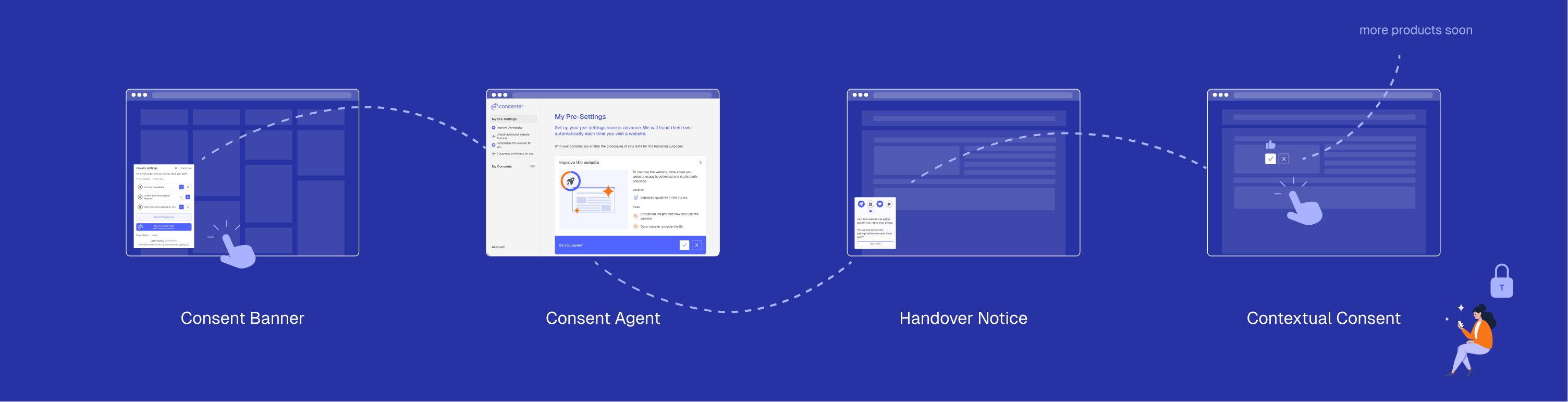 * First of all, we enable your users to set their preferences in advance and centrally in a digital assistant (Consenter agent), specifying the purposes for which they generally give their consent when visiting all sorts of websites. This is the only known way to prevent consent fatigue.
* A second component enables your end users to adapt their default settings on your website they are visiting to the specific data protection level of your site; this interaction again runs via a layered approach, which adapts your consent requests to your users' needs when interacting with your website (from a so-called handover notice to the Consenter Banner up to contextual consent).
* In further development steps, we will provide you with additional tools that you may offer your users to check and adjust the quality of their data once they have shared it with you on the basis of their consent.
* First of all, we enable your users to set their preferences in advance and centrally in a digital assistant (Consenter agent), specifying the purposes for which they generally give their consent when visiting all sorts of websites. This is the only known way to prevent consent fatigue.
* A second component enables your end users to adapt their default settings on your website they are visiting to the specific data protection level of your site; this interaction again runs via a layered approach, which adapts your consent requests to your users' needs when interacting with your website (from a so-called handover notice to the Consenter Banner up to contextual consent).
* In further development steps, we will provide you with additional tools that you may offer your users to check and adjust the quality of their data once they have shared it with you on the basis of their consent.