Consenter Risk-Assessment
Consenter Risk Assessment provides the methodological basis for evaluating your website configuration—more specifically, the configuration of the technologies used to operate your website.
Purpose of the risk assessment
As a key management tool within Consenter Manager, the Consenter Risk Assessment shows you how your specific website configuration affects
- the data protection risks for your website visitors,
- your legal compliance and
- your website visitors’ willingness to give consent.
Within the Consenter Manager, you can systematically assess, compare and optimise the data protection-related settings of your website technologies.
Legal basis
The risk assessment methodology is based on Article 25 of the GDPR (data protection by design and data protection by default) and Article 35 of the GDPR (data protection impact assessment). Both provisions require an assessment of the risks to the rights and freedoms of data subjects.
The implementation of this risk assessment methodology is based on a research and development process spanning over ten years, carried out in collaboration with European research institutions and data protection authorities. It combines data protection risk assessments with considerations on technical feasibility and clear communication.
Assessed Factors
The risk assessment takes into account, in particular:
- tracking methods used
- categories of personal data
- storage period
- storage location
- legal roles of third-party providers involved
- use and type of personalisation models
- purposes and specific nature of the processing
- context of data collection
Each selection option is assigned a weighted score. This weighting is based on its potential impact on fundamental rights such as privacy and informational self-determination, and is grounded in our research findings.
Role of third-party providers
Third-party technologies – such as Matomo or Google Analytics – are often central to the operation and further development of websites. However, different tools and configurations lead to different data protection implications. These depend, amongst other things, on the provider’s place of business, the data processed by default, and the respective purposes of processing.
Automated assessment in Consenter Manager
The assessment process is fully integrated into the Consenter Manager.
Each configuration change has an immediate impact on the calculated risk–benefit ratio, which is visualised in the Risk Benefit Wheel—a graphical representation of this ratio. This allows you to see in real time how your settings influence the data protection assessment.
Many risks arise from the interaction of multiple factors and only become significant once certain thresholds are reached. These interdependencies are also reflected in the Risk Benefit Wheel.
Third-Party Configuration Guides
For commonly used third-party technologies, we provide specific configuration guides. These typically include three levels of risk configurations:
- Low risk
- Medium risk
- High risk
These configurations span multiple settings and parameters. The guides give you a structured overview of the overall risk associated with different configuration options. When you implement your chosen settings in the Consenter Manager, the system automatically assigns the corresponding risk level to each individual option.
Configuration Recommendations
As a general rule, we recommend choosing a low-risk configuration. This has a positive effect on the overall assessment displayed in the cookie banner and can also improve your consent rates.
However, lower risk may come at the cost of reduced functionality or increased manual effort when configuring third-party technologies. If you wish to use the full functionality of these technologies, this is often associated with higher risks to the fundamental rights of your users.
The guides are designed to support you in making this trade-off consciously and transparently. You may follow the recommended configurations or deviate from them—they are intended as guidance only.
Communicating the Risk–Benefit Ratio
At the end of each configuration process, the Consenter Manager provides an overview of the resulting risk–benefit ratio for each processing purpose. The Consenter cookie banner communicates this ratio transparently to your website visitors.
Many websites currently operate with a below-average level of data protection. Therefore, the consent agent initially assumes such a baseline and explains the typical risks and benefits associated with each purpose. If you configure your third-party technologies in a more privacy-friendly way than other operators, this will be communicated to your visitors.
Transparent and privacy-friendly configurations help build user trust and have a positive impact on users’ willingness to give consent.
Changes in the Risk–Benefit Ratio (Trigger System)
If you make changes to your system, this may affect the level of risk for your website visitors. To comply with the GDPR’s transparency requirements, you must therefore keep your cookie banner up to date at all times.
When you create a new version of your cookie banner in the Consenter Manager, the system automatically compares the risks of your previous configuration with those of the new one and allows you to inform your website visitors about any changes.
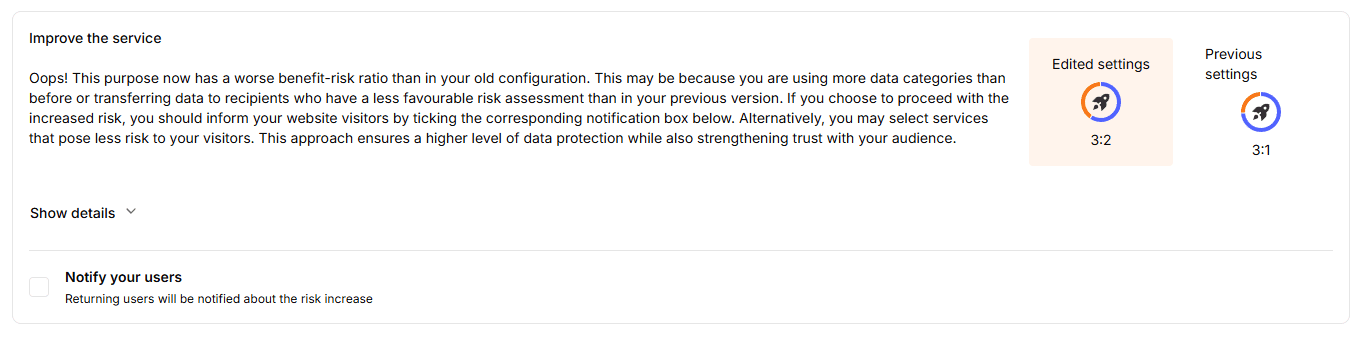
If the risks increase in the new configuration (for example, due to the transfer of personal data to a third country such as the United States), you will be notified. By selecting the corresponding option, you can trigger a notification that will be shown to returning visitors the next time they access your website.
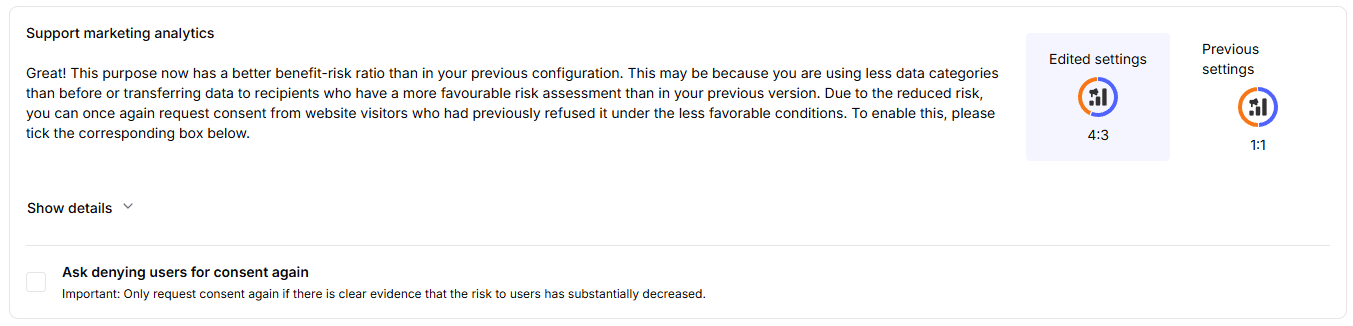
If, on the other hand, the risks are reduced, this changes the basis on which website visitors previously decided whether or not to consent to data processing. If users had refused consent under a higher-risk configuration, you may—by selecting the corresponding option—request their consent again (“again-consent”).
In this case, the cookie banner or, for users of a consent agent, the handover notice will be displayed again the next time they visit the website.
The versioning and trigger system operating in the background ensures that notifications are delivered only to the relevant users. Notifications about increased risks are shown only to users who previously gave consent, while notifications about reduced risks are shown only to users who previously refused consent.
In addition, users can access the cookie banner at any time to manually review the current risk information.
How is this guide?
Last updated on